
Quick Summary: Free Adobe Acrobat Alternatives Online (2026)
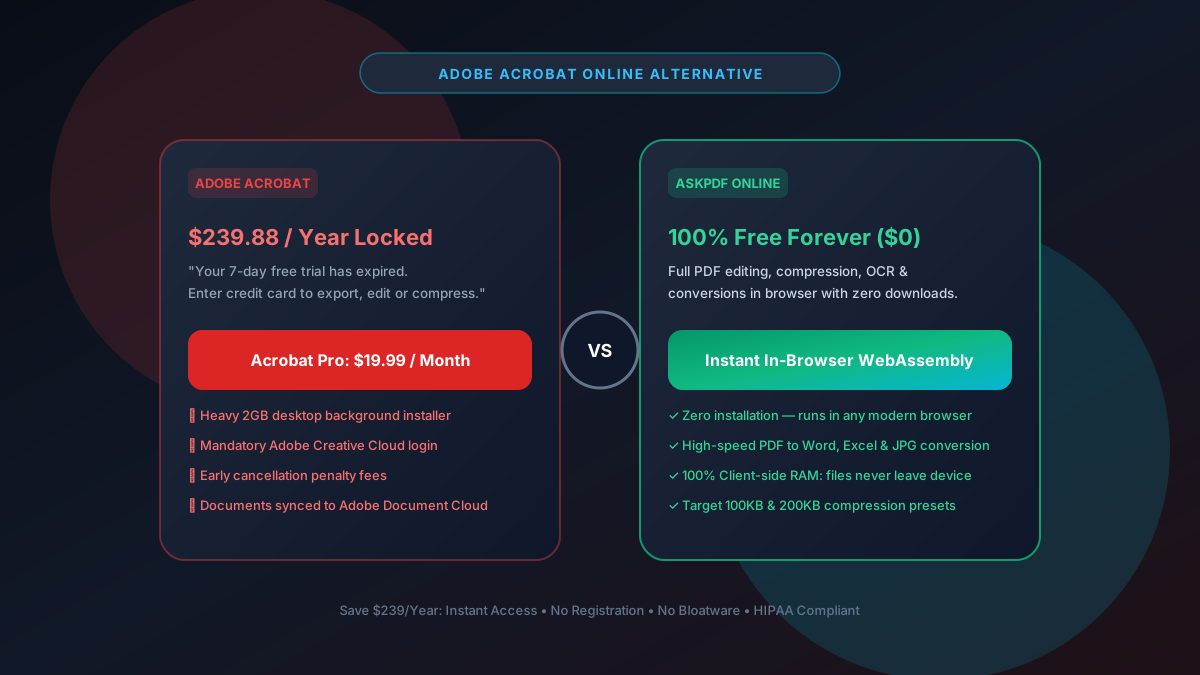
Adobe Acrobat Pro costs $239.88 per year and requires a heavy 2GB background software installation with strict cancellation penalties. In 2026, you can perform 95% of Acrobat's core features—including high-ratio compression, PDF to Word conversion, JPG merging, and password protection—100% free online using AskPDF.tech with zero installation.
| Feature / Capability | Adobe Acrobat Pro DC | AskPDF.tech (Online Suite) |
|---|---|---|
| Annual Subscription Cost | $239.88 / Year ($19.99/mo) | $0 Forever Free |
| Software Installation Footprint | 2GB+ desktop installer & bloatware | 0 MB (Runs instantly in web browser) |
| High-Ratio Compression Presets | Generic 'Reduce Size' preset | Dedicated Target 100KB & 200KB presets |
| Cancellation Fees & Contracts | Hefty early cancellation penalty | No accounts, contracts, or billing info |
| Client Privacy & Local Memory | Syncs to Adobe Document Cloud | 100% In-Browser RAM execution |
| PDF to Word / Image Conversions | Included (Requires active license) | Included Free with Zero Limits |
Core Takeaway: Unless you require specialized enterprise pre-press CMYK print calibration, paying $240/year for Adobe Acrobat is completely unnecessary. AskPDF delivers all essential conversion, compression, and security tools free in your browser.
Stop Paying $239/Year for Adobe Acrobat
Switch to AskPDF's zero-install, in-browser PDF suite. Private, fast, and 100% free forever.
The Hidden Traps of Adobe's Creative Cloud Subscription
Adobe discontinued perpetual licenses for Acrobat years ago, locking users into an auto-renewing $19.99/month ($239.88/year) subscription contract.
Users who attempt to cancel their subscription mid-year are frequently hit with an early termination penalty fee equal to 50% of the remaining contract balance.
In addition, the Adobe desktop client runs multiple persistent background services that consume CPU and RAM even when you are not using the software, while automatically syncing your sensitive documents to Adobe Document Cloud servers.
The Best Tested Free Alternatives (Ranked & Reviewed)
1. AskPDF.tech — Best In-Browser Acrobat Replacement
Zero Install • 100% FreeAskPDF provides all the routine day-to-day tools you normally open Acrobat for: compressing bloated scans down to 100KB, converting PDFs to Word documents, merging JPGs, and adding AES encryption.
2. PDFgear — Best Free Offline Desktop Acrobat Alternative
Free Desktop AppPDFgear is a relatively new desktop and iOS application that offers full offline PDF editing, page reordering, form filling, and OCR without charging a subscription.
3. Foxit PDF Editor — Best Enterprise Corporate Alternative
Enterprise AlternativeFoxit is the primary commercial rival to Adobe in enterprise environments, offering advanced digital signatures, redaction, and compliance tools.
4. LibreOffice Draw — Best Free Open-Source Text Editor
Open Source SuiteIncluded in the open-source LibreOffice suite, Draw allows you to open any PDF and edit the actual text, move layout blocks, and modify vector lines.
5. Apple Preview (macOS Built-in) — Best Built-in Mac Tool
Built-in macOSEvery Mac includes Preview, an astonishingly powerful native tool for merging PDFs, reordering pages, annotating, and digitally signing contracts.
How to Replace Adobe Acrobat Tasks for Free with AskPDF
Compressing PDFs Without Acrobat
Instead of opening Acrobat's 'Optimize PDF' tool, open AskPDF's Target 100KB compressor. Get a 70%+ file reduction in 2 seconds with zero software bloat.
Exporting PDF to Word Without a Subscription
Drag your PDF into AskPDF's PDF to Word tool. It parses text, layout, and tables into a clean .docx file ready for Microsoft Word or Google Docs.
Encrypting with AES-256 Without Creative Cloud
Use AskPDF's Protect Tool to apply cryptographic AES password protection. All hashing happens on your device without transmitting your password over the internet.
The Security Advantage: Zero Cloud Syncing & Strict Compliance
When using modern versions of Adobe Acrobat, the software routinely prompts you to save files to Adobe Document Cloud for collaboration. For lawyers bound by attorney-client privilege, healthcare providers subject to HIPAA, or CPAs handling tax filings, cloud synchronization introduces unnecessary compliance liability.
AskPDF operates under a mathematical zero-trust architecture: because all processing code runs inside the browser sandbox, your confidential files never touch an external server or third-party cloud disk. You get enterprise-grade document utility with complete compliance confidence.
Frequently Asked Questions
Q:How much does Adobe Acrobat Pro cost in 2026?
Adobe Acrobat Pro costs $19.99 per month billed annually ($239.88/year) with strict early termination cancellation penalties. Most everyday users only need basic compression, conversion, and signing, which can be accomplished 100% free using AskPDF.tech.
Q:Can I edit and convert PDFs without installing Adobe Creative Cloud?
Yes. AskPDF.tech runs entirely inside modern web browsers using WebAssembly. You can convert PDFs to Word, extract high-resolution JPG images, apply AES-256 passwords, and compress files without installing Adobe's 2GB+ background software suite.
Q:How do I compress a PDF like Adobe Acrobat's Optimize PDF tool for free?
Open AskPDF.tech and select the Target 100KB or Target 200KB compressor. AskPDF uses the same bicubic image re-sampling algorithms as Acrobat to downsample heavy scans while keeping vector fonts crisp, achieving over 70% size reduction in 2 seconds.
Q:Is AskPDF safe for legal, healthcare, and corporate documents?
Yes. Adobe Acrobat frequently prompts users to synchronize files to Adobe Document Cloud. AskPDF guarantees complete confidentiality by running 100% of processing in your device's browser RAM, fully satisfying HIPAA, GDPR, and enterprise confidentiality requirements.
Q:What is the best offline free alternative to Adobe Acrobat?
For offline desktop use, LibreOffice Draw (free open-source on Windows/Mac/Linux) allows direct text manipulation, while Apple Preview (built into macOS) offers native signing and page reordering without third-party installations.
Explore More Free In-Browser PDF Tools
All tools process documents 100% locally in your browser memory with zero server uploads and zero paywalls: