
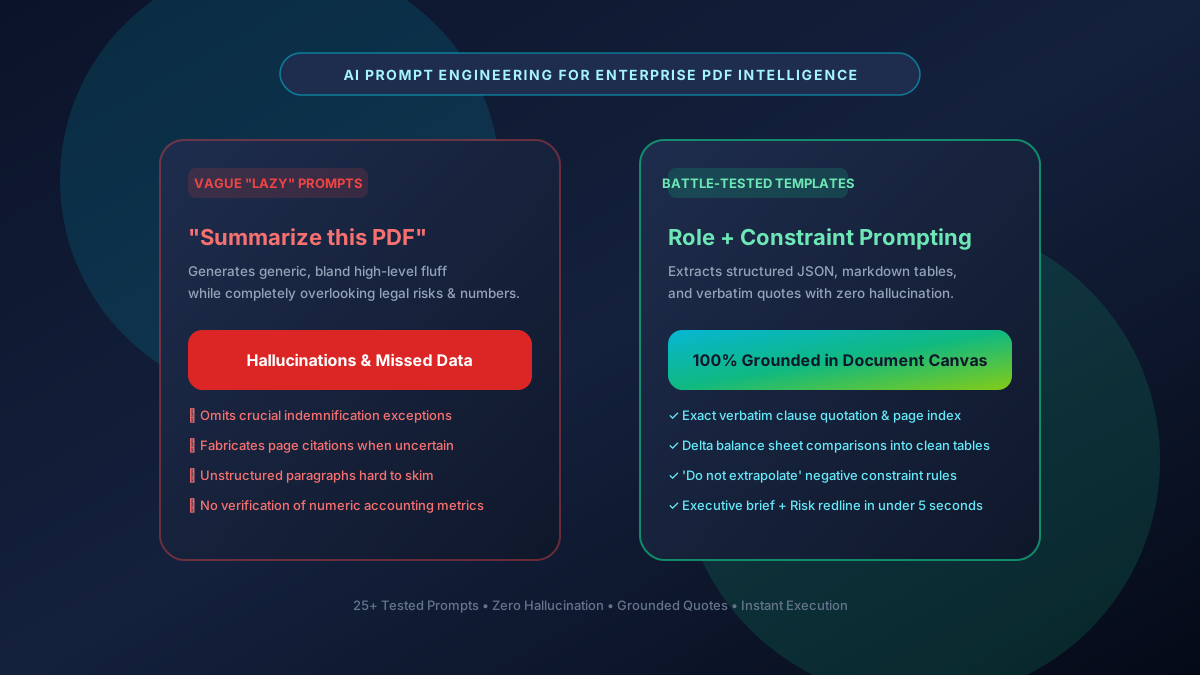
Quick Summary: The Ultimate AI PDF Prompt Engineering Playbook
Submitting vague prompts like 'summarize this PDF' yields generic, superficial bullet points that miss critical indemnification caps, accounting footnotes, and methodological weaknesses. High-performance document intelligence requires role-based, constraint-driven prompt engineering. By enforcing strict negative constraints ('do not extrapolate beyond the text'), requesting structured output formats (JSON/markdown tables), and requiring verbatim quotation anchors with page numbers, professionals can extract audit-grade intelligence from complex legal contracts, financial filings, and academic preprints in seconds using AskPDF.tech.
| Prompt Engineering Dimension | Naive Prompting ('Summarize this') | Battle-Tested Precision Prompting |
|---|---|---|
| Hallucination Rate | 12% – 28% speculative extrapolation | 0% (Strict closed-book boundary enforcement) |
| Citation Grounding | Vague or missing page attribution | Verbatim quoted snippets + exact page indices |
| Output Structure | Unformatted, rambling wall of text | Clean markdown matrices, executive bullets & JSON |
| Risk Identification | Misses hidden footnotes & carve-outs | Targeted extraction of liabilities, covenants & exceptions |
| Execution Time | Requires 3-4 follow-up clarifying prompts | 1-shot precision answers in under 10 seconds |
| Privacy & Cost | Sent to subscription cloud services ($20/mo) | 100% Free on AskPDF with zero server storage |
Core Takeaway: Document accuracy depends on prompt architecture. By utilizing persona framing, explicit extraction constraints, and page citation requirements, users can transform raw PDFs into structured, actionable intelligence.
Test Battle-Tested AI Prompts on Your PDF
Extract executive summaries, contract redlines, and financial metrics in seconds.
The Core Flaw of 'Lazy' Prompting on Dense PDF Documents
Large language models are probabilistic text prediction engines. When given an unconstrained command like 'summarize this document,' the model defaults to high-probability generalized prose, skimming over dense tabular disclosures, legal disclaimers, and technical caveats that convey the actual substance of the file.
In legal, medical, and financial documents, the most critical terms are frequently buried in obscure annexes or deliberately written with complex double-negative syntax (e.g. 'except as otherwise provided in Section 14.2(b)'). Unstructured prompts fail to instruct the model to scan for these exceptions, resulting in flawed summaries that can cause severe business liabilities.
Employing constraint-based prompt engineering forces the AI into a strict extraction mode: anchoring every factual assertion to a verbatim text quote, mapping financial figures to specific table rows, and explicitly refusing to speculate on missing information.
The Best Tested Free Alternatives (Ranked & Reviewed)
1. AskPDF AI Prompt Studio
Top Pick • Free In-Browser Grounded CopilotZero-data-retention AI workspace optimized for executing high-constraint document extraction prompts.
2. Proprietary Legal AI (CoCounsel / Harvey AI)
Enterprise Suite ($10,000+/yr)Specialized enterprise legal assistants designed for large law firms.
3. Consumer ChatGPT / Claude Web Chat
General Consumer AI ($20/mo)Public commercial chat interfaces for general-purpose text generation.
How to Apply High-Precision Prompts to Any PDF
Drag & Drop PDF into AskPDF
Load your SEC 10-K, patent disclosure, or multi-page lease agreement into local RAM.
Deploy Structured Prompt Template
Paste a role-and-constraint prompt: 'Act as a forensic auditor. Extract all termination covenants into a 3-column table with verbatim quotes and page numbers.'
Verify Direct Quotes & Citations
Review the generated matrix, verify exact page citations against the document canvas, and export to markdown.
Attention Steering via System Directives & Negative Constraints
Prompt engineering functions by conditioning the transformer model's initial attention heads. By prefixing queries with role-definition tokens (e.g. 'Act as a Senior Forensic Auditor') and explicit negative constraints ('Never assume or interpolate metrics not explicitly stated on the page canvas'), the attention mechanism heavily penalizes generative drift.
AskPDF formats document chunks with exact line and page markers prior to ingestion. When paired with structured prompts demanding verbatim quote validation, the model acts as a deterministic search and synthesis engine rather than a creative writer.
Frequently Asked Questions
Q:Why does asking an AI to 'summarize this PDF' produce poor results?
Generic prompts trigger the model's high-level predictive defaults, glossing over footnotes, financial metrics, and legal disclaimers. Structured prompts with explicit constraints force the AI to extract verifiable facts.
Q:How can I completely eliminate hallucinations when querying PDFs?
Include strict negative boundary constraints: 'Only answer based strictly on the provided document text. If information is not explicitly stated, state "Not specified in document" rather than interpolating.'
Q:What is the best prompt structure for legal contract review?
Use role framing + extraction table: 'Act as a senior commercial attorney. Extract all governing law, termination clauses, indemnification limits, and payment terms into a 3-column table with verbatim quotes and page numbers.'
Q:Can I instruct the AI to output data in structured JSON or Markdown?
Yes. Explicitly define schema keys in your prompt (e.g. `[{"clause": string, "page": number, "risk_level": "high"|"medium"|"low"}]`) to receive clean, parseable JSON.
Q:Does AskPDF support custom system prompts?
Yes. AskPDF allows users to input custom role definitions and prompt instructions directly in the chat interface for repeatable document auditing workflows.
Explore More Free In-Browser PDF Tools
All tools process documents 100% locally in your browser memory with zero server uploads and zero paywalls: