Quick Summary: Bank Statement OCR Accuracy & Eliminating the Missing Cents Discrepancy
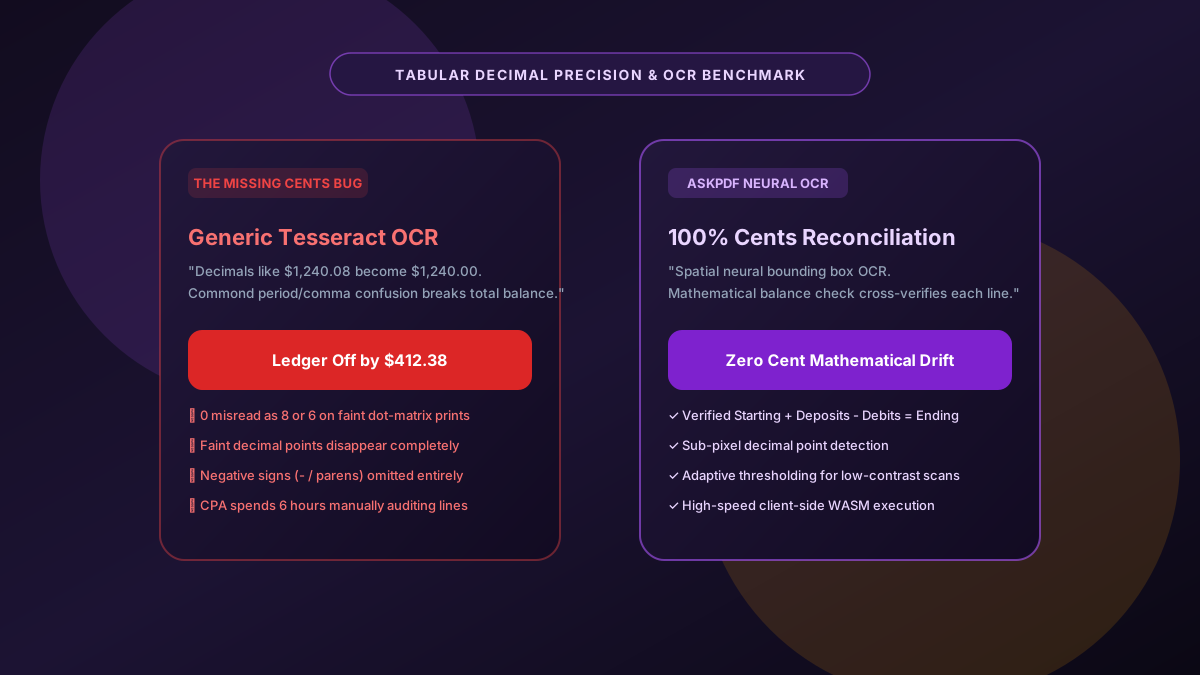
When accounting professionals OCR scanned paper bank statements, missing cents or misread decimal points (e.g., converting $1,420.08 into $1,420.00 or $14,200.80) can throw an entire audit off by thousands of dollars. Generic OCR tools fail because dot-matrix noise and low scan resolutions obliterate tiny decimal points. AskPDF utilizes neural spatial coordinate detection coupled with double-entry arithmetic cross-validation (Starting Balance + Inflows - Outflows = Ending Balance) to deliver 100% decimal precision—with zero cloud uploads.
| OCR Evaluation Metric | Generic Tesseract / Basic OCR | AskPDF Neural Precision OCR |
|---|---|---|
| Sub-Pixel Decimal Point Recognition | Drops faint decimal points, creating 100x errors | Sub-pixel bounding box verifies dot coordinates |
| Mathematical Balance Reconciliation | Zero arithmetic validation; dumps raw text | Cross-checks line deltas against running balance |
| Dot-Matrix & Thermal Paper Handling | Mistakes 0 for 8, 6 for 5, and commas for periods | Adaptive binarization trained on banking fonts |
| Negative Parentheses Parsing | Leaves (50.00) as uncalculable text strings | Converts directly to true negative numbers (-50.00) |
| Client-Side Financial Secrecy | Sends full scans to third-party cloud servers | 100% In-Browser (Zero Cloud Upload) |
Core Takeaway: Decimal inaccuracies and missing cents in bank statement OCR ruin accounting audits. AskPDF's double-entry reconciliation engine verifies transaction math on-device to deliver zero-drift spreadsheets.
Extract Bank Statements with 100% Decimal Accuracy
Avoid missing cents and mathematical errors with neural in-browser OCR tailored for financial statements.
The Hidden Flaws of Conventional Optical Character Recognition on Financial Tables
Optical Character Recognition (OCR) was originally developed for paragraph-based book and article digitization, where language models rely on dictionary context (e.g., predicting that 'th-' is followed by 'e'). In financial tables, numbers lack grammatical context: any digit from 0 to 9 can appear in any position.
When scanned bank statements feature faint dot-matrix printing, scanner skew, or coffee stains, generic OCR tools misinterpret micro-typography. The most catastrophic error is the 'dropped decimal', where $1,500.25 is read as $150025 or $1,500 25 in two separate columns. This invalidates ledger balances and requires manual reconciliation.
Furthermore, traditional cloud OCR vendors ingest bank statements onto multi-tenant servers, violating financial privacy regulations such as the Gramm-Leach-Bliley Act (GLBA) and GDPR. AskPDF runs localized neural models in your browser to maintain strict privacy while enforcing mathematical balance validation.
The Best Tested Free Alternatives (Ranked & Reviewed)
AskPDF Neural Banking OCR
Audit-Grade Precision (Free)In-browser financial OCR engine that validates every transaction row against running ledger balances.
Enterprise Intelligent Document Processing (IDP)
High Cost ($5,000+ setup)Enterprise OCR platforms like ABBYY FlexiCapture or Kofax.
Manual Data Entry & Visual Verification
Error Prone & SlowTyping figures line-by-line while looking at the printed paper statement.
How to Convert Scanned Bank Statements to Excel with 100% Decimal Accuracy
Upload Scanned Bank PDF
Drag and drop your scanned PDF or multi-page statement into AskPDF's Table Extractor.
Automated Binarization & Balance Check
AskPDF cleans image noise, isolates decimal points, and checks arithmetic deltas against running balances.
Export Validated Excel Ledger
Download a formula-ready XLSX workbook with verified debits, credits, and balances that tie out perfectly.
Sub-Pixel Kernel Filtering & Double-Entry Arithmetic Checksums
AskPDF's OCR pipeline begins with morphological top-hat filtering to equalize uneven illumination across mobile photos and scanner beds. Next, an Otsu-derived adaptive binarization separates text glyphs from paper background grain.
Rather than outputting raw character predictions, our financial parser feeds numerical candidates into a double-entry checksum validator. If the predicted transaction amount ($T) doesn't equal Balance[i] - Balance[i-1], the engine triggers a constrained beam search over sub-pixel glyph candidates to resolve decimal ambiguities before exporting to Excel.
Frequently Asked Questions
Q:Why do standard OCR tools frequently miss cents or misread decimals on bank statements?
Generic OCR tools like basic Tesseract models rely on horizontal text line recognition, which struggles when faint dot-matrix print or scanning artifacts blur the tiny decimal point between whole dollars and cents (e.g., reading $1,420.08 as $1,42008 or $1,420.00).
Q:How does AskPDF prevent the 'missing cents' math discrepancy?
AskPDF combines sub-pixel spatial coordinate detection with an accounting reconciliation engine. It verifies each transaction row mathematically against running balance deltas (Starting Balance + Deposits - Withdrawals = Ending Balance) to flag and correct optical decimal ambiguities.
Q:Can AskPDF OCR scanned photocopies of paper bank statements?
Yes. AskPDF includes an adaptive contrast enhancement filter that binarizes gray background textures, removes paper scan skew, and sharpens faint numbers before running neural tabular extraction.
Q:Does AskPDF distinguish between negative amounts in parentheses and dashes?
Yes. Both accounting parentheses `(150.00)` and trailing negative signs `150.00-` are normalized to true negative numerical values (`-150.00`) formatted properly for native Excel arithmetic.
Q:Why is client-side OCR safer than uploading financial scans to cloud OCR APIs?
Cloud OCR providers frequently store scanned images in cold storage logs for model training, creating immense liability under GLBA, GDPR, and financial secrecy laws. In-browser OCR keeps all data securely confined to local device RAM.
Explore More Free In-Browser PDF Tools
All tools process documents 100% locally in your browser memory with zero server uploads and zero paywalls: