Quick Summary: Batch Converting Multiple PDF Statements into One Master Excel Workbook
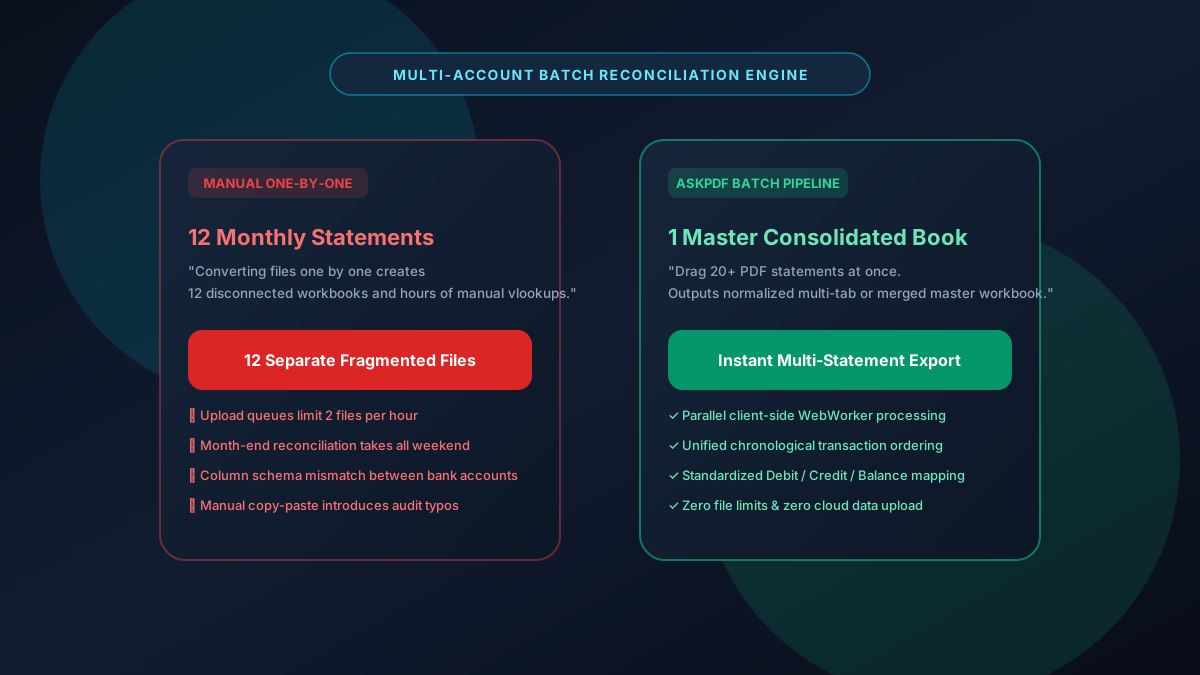
Bookkeepers, auditors, and treasury managers routinely juggle dozens of monthly bank and credit card PDF statements across multiple operating accounts. Converting them one-by-one creates dozens of fragmented spreadsheets and requires hours of copy-pasting. AskPDF's Batch Table Extractor allows you to drop 20+ statements at once and merges them into a single consolidated, chronologically-sorted Excel workbook or separate account tabs in under 8 seconds—100% locally in your browser memory.
| Batch Extraction Feature | Generic Cloud Converters | AskPDF Batch Statement Suite |
|---|---|---|
| Simultaneous Multi-File Batching | Paywalls after 1-2 files ($30/mo) | Unlimited multi-statement batching for free |
| Master Workbook Consolidation | Downloads as separate zip files | Merges into 1 consolidated chronological sheet |
| Cross-Bank Schema Alignment | Column names differ across banks | Normalizes Date/Payee/Debit/Credit columns |
| Batch Processing Speed (12 Files) | 3-5 minutes (server queues) | Under 8 seconds via WebAssembly Workers |
| Account Number & PII Privacy | Transmits financial accounts to cloud | 100% In-Browser (Zero Cloud Upload) |
Core Takeaway: Batch PDF-to-Excel conversion consolidates multi-account statements into a single, unified financial ledger while protecting banking PII with zero-upload local processing.
Batch Convert Your PDF Statements to Excel Now
Drop all your monthly bank and card statements into AskPDF to export a single unified spreadsheet in seconds.
The Bottlenecks of Multi-Account Month-End Reconciliation
During month-end and fiscal year-end close, accounting teams must reconcile transactions across operating checking, payroll, credit cards, merchant processing (Stripe, PayPal), and investment accounts. Each financial institution exports PDFs with distinct layout schemas, font encodings, and table boundaries.
Using single-file web converters forces CPAs to upload files one at a time, wait through artificial queue delays, download a cluttered folder of ZIP archives, and manually copy-paste rows from twelve spreadsheets into a unified master ledger.
Manual consolidation introduces human transposition errors, duplicate transaction rows, and column alignment drift. AskPDF automates the entire ingestion pipeline by parsing multiple PDF streams simultaneously and normalizing heterogeneous banking schemas into a continuous, pivot-table ready dataset.
The Best Tested Free Alternatives (Ranked & Reviewed)
AskPDF Batch Table Extractor
Reconciliation Favorite (Free)Client-side multi-threaded statement parser that merges multiple banking PDFs into one continuous or multi-tab Excel workbook.
Legacy Bank Feed Scraping SaaS (Plaid/Yodlee)
API Subscription ($200+/mo)Direct banking aggregation APIs that pull raw account feeds.
Manual One-by-One Copying
High OverheadConverting statements one-at-a-time and manually stacking data rows.
How to Batch Convert Multiple PDF Statements into One Master Excel Workbook
Select Multiple Statement PDFs
Drag and drop up to 20+ PDF statements from Chase, Bank of America, Amex, or Wells Fargo into AskPDF.
Automated Schema Normalization
Parallel Web Workers extract tables, balance debits/credits, and align transaction headers simultaneously.
Download Master Consolidated Workbook
Open the single XLSX file with all accounts consolidated into chronological order, ready for immediate audit.
Parallel WebWorker Architecture & Schema Mapping Heuristics
AskPDF deploys a pool of WebAssembly worker threads that distribute PDF parsing tasks across all available CPU cores. Each worker thread processes a separate statement concurrently without blocking the browser UI thread.
An adaptive schema mapping engine analyzes the first page of each file, scoring column candidates against a semantic financial taxonomy (e.g., matching 'Posting Date', 'Txn Date', and 'Value Date' to a canonical Date column). The system then concatenates the normalized records into a single continuous OpenXML stream.
Frequently Asked Questions
Q:Can I convert multiple PDF bank statements into a single Excel file at once?
Yes. AskPDF allows you to select 10, 20, or more PDF statements simultaneously. You can choose to export them as individual tabs within a single master XLSX workbook or merge all transactions into one continuous chronological table.
Q:How does batch conversion handle statements from different banks (e.g., Chase and BoA)?
AskPDF uses adaptive schema mapping to identify and normalize core transaction fields—Date, Payee / Description, Debit, Credit, and Balance—across varying banking layouts into standardized Excel columns.
Q:Is there a limit on how many PDFs I can batch process together?
There are no artificial file batch limits. Processing executes locally via client-side Web Workers, utilizing your computer's native multi-core CPU power rather than being restricted by cloud server queue caps.
Q:How fast is batch PDF-to-Excel conversion?
Because processing runs compiled WebAssembly in-browser without uploading large files over your network, a typical batch of 12 monthly statements finishes in under 8 seconds.
Q:Are confidential business account balances exposed during batch conversions?
No. Every statement in the batch is processed 100% locally in your browser memory. No transactional records, account numbers, or balances are ever uploaded to any cloud server.
Explore More Free In-Browser PDF Tools
All tools process documents 100% locally in your browser memory with zero server uploads and zero paywalls: