Quick Summary: Chatting with Multiple PDFs Simultaneously Without Paywalls
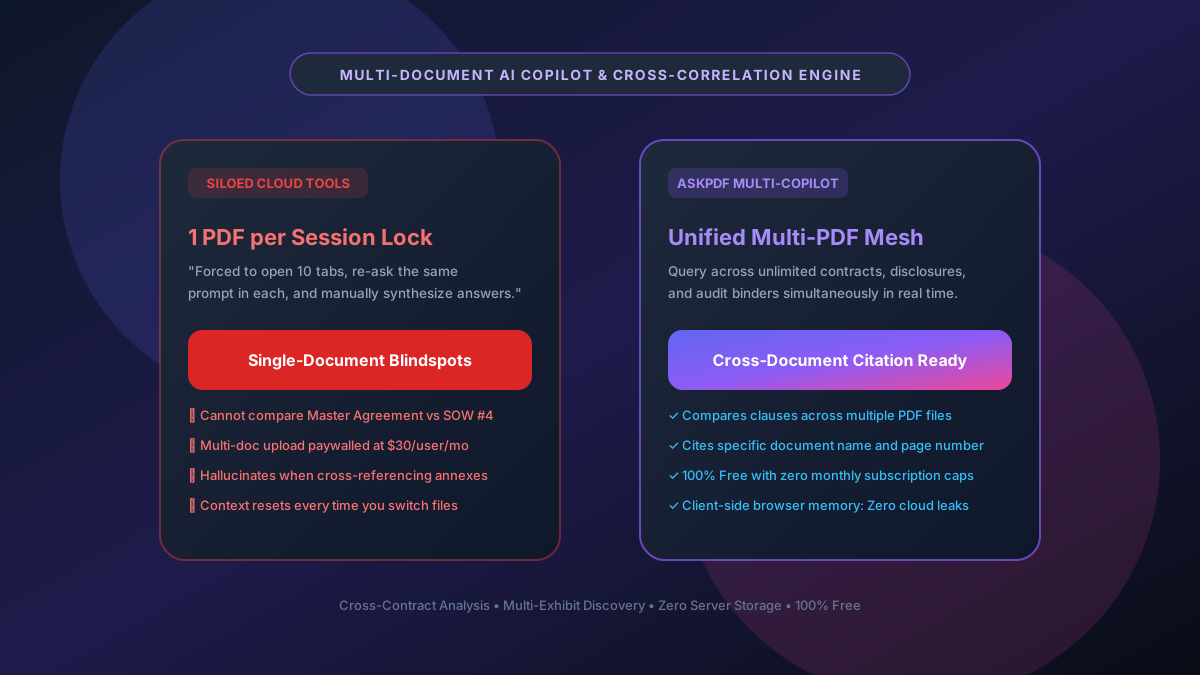
Traditional cloud AI document tools restrict users to uploading a single PDF at a time or lock multi-document query capabilities behind expensive enterprise tiers ($20 to $50/user/month). Comparing provisions across a Master Service Agreement and three statements of work, or cross-referencing trial transcripts with medical records, requires a multi-document synthesis engine. AskPDF.tech enables simultaneous, cross-correlated querying across multiple PDF files directly within your browser. Loaded into local volatile memory via WebAssembly, your documents are cross-indexed in real time, returning grounded answers with page-level citations across all files with zero server storage.
| Multi-Document Feature | Typical Cloud AI (ChatPDF, Smallpdf) | AskPDF Multi-PDF Copilot |
|---|---|---|
| Simultaneous PDF Ingestion | Single file only (or paywalled at $20/mo) | Multiple PDFs loaded concurrently in 1 session |
| Cross-Document Cross-Referencing | Fails; requires switching document tabs | Unified semantic index across all active files |
| Citation Precision | Generic or fabricated page citations | Explicit Document Name + Page Number attribution |
| Document Privacy & Storage | Transmitted to multi-tenant cloud vector DBs | 100% Client-Side RAM (Zero cloud storage) |
| File Size & Token Budget | Strict 10MB or 50-page file caps | Handles multi-hundred page repositories locally |
| Price & Subscription | $15–$30/month per seat | $0 Free with no usage caps or paywalls |
Core Takeaway: Enterprise legal review and academic research require comparing multiple documents at once. AskPDF's multi-document copilot links disconnected PDF files in local browser RAM, allowing users to query contracts, transcripts, and financial disclosures simultaneously without subscription fees.
Chat Across Multiple PDFs Simultaneously
Cross-reference contracts, research papers, and discovery binders with zero server uploads.
Why Most AI Tools Restrict You to a Single PDF at a Time
Multi-document question answering poses a severe computational challenge for cloud SaaS providers. Storing embeddings for multiple large PDFs in server-side vector databases (such as Pinecone or Weaviate) multiplies RAM and indexing costs exponentially for the provider. To protect profit margins, tools like ChatPDF, Smallpdf AI, and PDFgear Online limit free users to a single document per session, forcing users to open multiple browser tabs and manually compare fragmented answers.
Furthermore, naive retrieval-augmented generation (RAG) pipelines struggle with multi-document cross-attention. When query embeddings retrieve text chunks from five different PDFs simultaneously, standard cloud models frequently suffer from 'context dilution'—conflating clauses from Document A with definitions from Document B and hallucinating non-existent contractual terms.
AskPDF overcomes this architectural constraint by running a local client-side coordinator in WebAssembly. Documents are partitioned with distinct cryptographic namespace hashes in browser volatile memory, allowing the neural engine to maintain strict source boundaries while answering multi-hop queries across all documents.
The Best Tested Free Alternatives (Ranked & Reviewed)
1. AskPDF Multi-PDF Copilot
Top Pick • Free Browser EssentialZero-knowledge multi-document AI engine that analyzes multiple PDFs simultaneously in browser memory.
2. Enterprise Cloud AI (Humata / ChatPDF Plus)
Paid Cloud ($20–$50/mo)Commercial cloud subscription services supporting multi-document folders.
3. Local Python LangChain / LlamaIndex Setup
Self-Hosted Technical SetupCustom local script utilizing Python, ChromaDB, and local Ollama LLMs.
How to Chat Across Multiple PDFs with AskPDF
Select & Load Multiple PDFs
Drag and drop your contracts, research papers, or discovery binders together into AskPDF Chat.
Ask Cross-Document Queries
Ask multi-file questions: 'Compare the liability limitations in Exhibit A with the indemnity clause in Master Agreement B.'
Review Verifiable Citations
Inspect inline source tags indicating the exact document title and page number for every synthesis.
Namespaced Hierarchical Vector Indexing in WebAssembly
To enable cross-document synthesis without memory collisions, AskPDF assigns a deterministic cryptographic identifier (SHA-256 namespace) to each loaded PDF in browser volatile RAM. Extracted text chunks are tagged with both their global document metadata and local page coordinate vectors.
When a query is dispatched, the retrieval engine executes a dual-tier semantic scan: first isolating topically relevant document clusters, then ranking intra-document passage vectors. This prevents context cross-contamination and ensures that citations explicitly map back to the precise page and filename.
Frequently Asked Questions
Q:How do I chat with more than one PDF at the same time?
Simply drag and drop multiple PDF files into AskPDF. The local WebAssembly engine parses and indexes each document into a unified memory namespace, allowing you to ask cross-document comparison queries in a single chat prompt.
Q:How does the AI know which document an answer came from?
AskPDF tags every extracted passage with both its source file name and page coordinate. When synthesizing responses, the AI generates inline citations indicating the exact document title and page number.
Q:Is there a limit on how many PDFs I can upload?
Because AskPDF runs client-side in your browser RAM, there are no artificial paywalls or document quantity caps. You can analyze as many files as your device's available memory permits.
Q:Are my documents uploaded to a remote vector database?
No. Unlike commercial cloud tools that store embeddings in third-party databases, AskPDF keeps all document vectors in volatile browser memory that is wiped instantly when you close your tab.
Q:Can AskPDF compare different versions of a contract to highlight revisions?
Yes. By loading both Version 1 and Version 2, you can prompt AskPDF to identify deleted covenants, changed liability caps, or altered indemnification wording between the two documents.
Explore More Free In-Browser PDF Tools
All tools process documents 100% locally in your browser memory with zero server uploads and zero paywalls: