Quick Summary: Converting PDF Invoices into QuickBooks & Xero Batch Spreadsheets
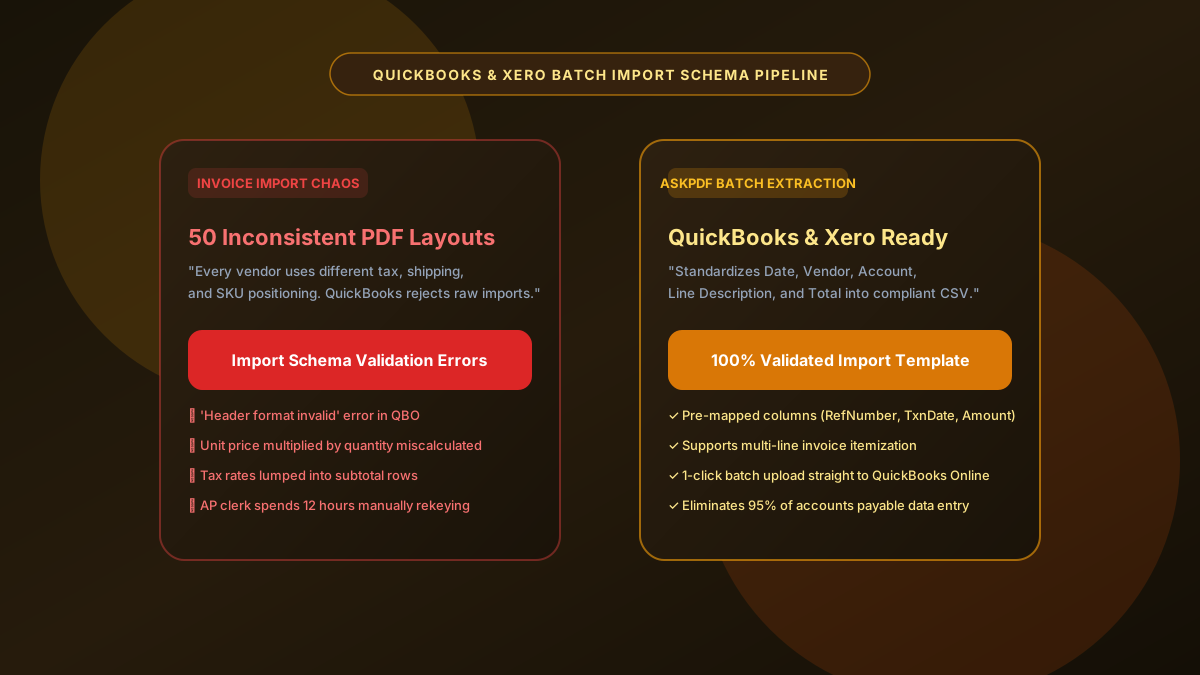
Accounts payable (AP) teams and bookkeepers spend dozens of hours every month manually retyping vendor PDF invoices into QuickBooks Online (QBO) and Xero. Manual copy-pasting frequently fails because accounting software requires strict columnar schemas—such as Invoice Date, Invoice No, Vendor Name, Line Description, Quantity, Rate, and Line Total. AskPDF's Invoice Batch Converter automatically parses inconsistent vendor PDF invoices and maps them into standardized spreadsheet templates pre-formatted for direct 1-click batch import into QuickBooks and Xero.
| Invoice Import Feature | Manual AP Entry / Basic Converters | AskPDF AP Batch Suite |
|---|---|---|
| QuickBooks & Xero Schema Mapping | Requires manual column mapping and re-ordering | Pre-mapped standard import schema (CSV & XLSX) |
| Line-Item vs Subtotal Separation | Mixes tax, shipping, and line items into single rows | Cleanly isolates line items, freight, and sales tax |
| Batch Multi-Invoice Processing | Convert one file at a time behind a paywall | Process multi-invoice batches in seconds for free |
| Vendor Pricing Privacy | Uploads negotiated vendor rates to third-party clouds | 100% In-Browser (Zero Cloud Upload) |
| Per-Invoice Processing Cost | $0.30 - $1.50 per invoice on legacy AP software | 100% Free with zero subscription fees |
Core Takeaway: Stop manual AP ledger entry. AskPDF extracts multi-vendor invoice PDFs into standardized, pre-mapped spreadsheet formats ready for instant 1-click import into QuickBooks and Xero.
Convert Invoices to QuickBooks & Xero Today
Automate your accounts payable data entry. Convert PDF invoices to batch-ready sheets in seconds.
Why Manual Invoice Entry and Generic PDF Converters Fail AP Workflows
Every vendor formats their invoices differently: some place the invoice number at the top-right, others embed it in a middle reference box; some calculate local sales tax before freight, while others combine them into a single summary block. When AP specialists attempt to copy-paste these tables into Excel, the irregular structures break down, requiring hours of manual cell adjustments.
Moreover, modern cloud accounting platforms like QuickBooks Online, QuickBooks Desktop, Xero, and Sage have strict batch-import validation rules. If a single required column header (such as `InvoiceDate`, `RefNumber`, or `LineAmount`) is misspelled, formatted with non-standard date punctuation, or contains invalid characters, the entire batch import is rejected.
Legacy AP automation SaaS platforms charge exorbitant setup fees ($2,000+) plus per-invoice usage fees ($0.30 to $1.50 per document). AskPDF delivers enterprise-grade columnar extraction without subscriptions or data collection, giving small businesses and freelance bookkeepers a fast, free route to automated accounting.
The Best Tested Free Alternatives (Ranked & Reviewed)
AskPDF AP Invoice Converter
Bookkeeper Favorite (Free)Zero-knowledge invoice extractor that standardizes vendor PDFs into validated QuickBooks and Xero import sheets.
Commercial AP Automation Software (Bill.com, Tipalti)
Enterprise SaaS ($100-$500+/mo)End-to-end accounts payable workflows with approval routing and electronic payments.
Manual Ledger Entry into Accounting Software
High Overhead & SlowTyping each vendor invoice line-by-line into QuickBooks or Xero.
How to Convert PDF Invoices into QuickBooks Batch Spreadsheets
Select Vendor Invoice PDFs
Drag and drop one or multiple vendor PDF invoices into AskPDF's Table Extractor.
Automated AP Field Mapping
AskPDF parses vendor names, invoice numbers, line item descriptions, quantities, and totals into standard accounting columns.
Import Directly into QuickBooks or Xero
Download the pre-formatted CSV or XLSX spreadsheet and upload it via QuickBooks Online Batch Transactions or Xero Bills Import.
Hierarchical Document Layout Parsing & Header-Detail Association
Invoices exhibit a hierarchical 'header-detail' structure: global metadata (Vendor Name, Invoice Date, PO Number) resides in the header band, while repeating transactional line items (SKU, Description, Unit Price, Line Total) reside in an inner table.
AskPDF uses multi-region layout analysis to first extract document-level metadata, then applies geometric line-item segmentation to parse the inner transaction table. The system automatically associates the global metadata with each line-item record, generating flat, fully normalized spreadsheet rows that satisfy the strict relational import requirements of QuickBooks and Xero.
Frequently Asked Questions
Q:Why does QuickBooks reject manually copied invoice spreadsheets?
QuickBooks Online (QBO) and Xero require strict columnar schemas for batch transaction imports: Invoice Date, Invoice Number, Customer/Vendor Name, Line Item Description, Quantity, Rate, and Total Amount. Manually copied tables have misaligned headers and missing columns that trigger schema validation rejections.
Q:How does AskPDF format invoices for QuickBooks and Xero batch imports?
AskPDF extracts invoice data into standardized columns pre-mapped for accounting software imports. It cleanly parses header information (PO number, invoice date, terms) and line-item tables (SKUs, quantities, unit prices) into structured Excel or CSV formats.
Q:Can I convert batches of multiple vendor PDF invoices at once?
Yes. You can drag and drop multiple vendor invoices into AskPDF. The tool processes the batch and generates consolidated spreadsheet rows ready for multi-invoice import.
Q:How does the tool handle sales tax, discounts, and shipping lines?
AskPDF separates subtotal, discounts, freight/shipping charges, and local sales tax into dedicated fields so your accounts payable entries reconcile to the penny against vendor statements.
Q:Is there any cost or subscription fee for processing accounts payable invoices?
No. Unlike legacy AP automation tools that charge $0.30 to $1.50 per invoice processed, AskPDF provides 100% free, unlimited invoice conversions with no subscription requirements.
Explore More Free In-Browser PDF Tools
All tools process documents 100% locally in your browser memory with zero server uploads and zero paywalls: