
Quick Summary: Unlocking and Converting Encrypted Bank Statements to Excel
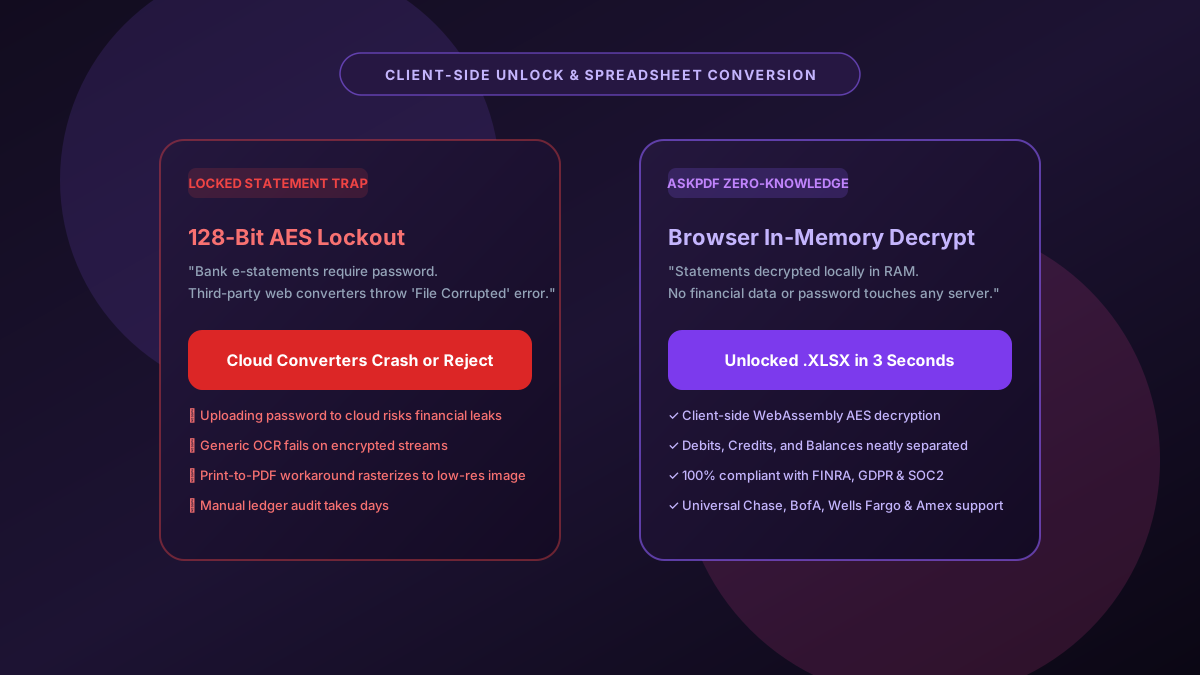
Many financial institutions (including Chase, Bank of America, Wells Fargo, and Barclays) issue electronic bank statements and tax documents protected with 128-bit or 256-bit AES encryption passwords. Standard online conversion utilities immediately crash or reject locked PDFs, while insecure websites require uploading both your private password and unencrypted financial records to their remote cloud servers. AskPDF enables you to decrypt password-protected bank statements locally inside your browser and convert them into clean, structured Excel spreadsheets in seconds with zero data leakage.
| Encrypted Statement Feature | Generic Cloud Converters | AskPDF Zero-Knowledge Suite |
|---|---|---|
| Password Decryption Location | Requires sending password & PDF to remote servers | 100% Client-Side WebAssembly Decryption |
| Financial Record Privacy | Stores unencrypted bank statements on cloud disks | Zero Server Storage (Processed in Browser RAM) |
| AES-128 & AES-256 Support | Crashes with 'Corrupted File' or 'Unsupported Encryption' | Full support for standard banking encryption protocols |
| Transaction Grid Structure | Merges debits, credits, and running balances | Cleanly isolates dates, descriptions, deposits, and withdrawals |
| Pricing & Limits | Subscription paywall after 1 file ($19-$49/mo) | 100% Free with unlimited conversions |
Core Takeaway: Never upload encrypted bank statements or passwords to third-party cloud servers. AskPDF decrypts and extracts password-locked bank statements locally in your browser with zero data leakage.
Unlock and Convert Bank Statements to Excel
Decrypt password-protected statements and export clean spreadsheets in 3 seconds—100% locally.
The Security Risk of Uploading Encrypted Bank Statements to Cloud Converters
When retail and commercial banks issue monthly statements, they frequently lock the PDF using user-level AES encryption to protect sensitive customer data in transit. The unlock password is often based on predictable personal identifiers, such as the last 4 digits of the account holder's Social Security Number (SSN), tax ID, or date of birth.
Most free web-based PDF converters cannot parse encrypted PDF streams. Those that do offer password unlocking require you to type your password into an online form and transmit both the locked file and the secret key to their cloud infrastructure. This exposes your entire banking history—including account numbers, routing numbers, home addresses, payroll deposits, and confidential spending patterns—to third-party database breaches, rogue employees, and server logs.
AskPDF solves this critical vulnerability by running the entire cryptographic decryption process on your local device. The password is fed directly into a local WebAssembly crypto module that unlocks the file in volatile memory, extracts the transactional table, and outputs a clean Excel file without transmitting a single byte over the web.
The Best Tested Free Alternatives (Ranked & Reviewed)
AskPDF Zero-Knowledge Statement Converter
Most Secure (Free)Browser-based cryptographic unlocking and table extraction engine that safeguards banking credentials and transaction records.
Adobe Acrobat Pro Decrypt & Export
Desktop Application ($239/yr)Official Adobe desktop application with manual password removal and export to Excel.
Print-to-PDF Virtual Printer Workaround
Lossy WorkaroundOpening the locked statement with a password and printing it to a new unlocked PDF file.
How to Unlock and Convert Encrypted Bank Statements into Excel
Select Locked Bank PDF
Drag and drop your password-protected bank statement into AskPDF's Table Extractor.
Enter Statement Password Locally
Provide your password (e.g., last 4 of SSN or DOB) to decrypt the document locally inside your browser RAM.
Download Clean Excel Spreadsheet
Receive an unlocked XLSX or CSV spreadsheet with perfectly aligned transaction dates, payees, and balances.
WebAssembly-Compiled Cryptographic Decryption & In-Memory Isolation
AskPDF utilizes a compiled WebAssembly binary containing a standard AES-128 and AES-256 decryption implementation conforming to ISO 32000-1 (PDF Standard Security Handler Revision 2 through 6).
When the user inputs their password, the key derivation function (PBKDF2 or SHA-256 depending on encryption revision) executes strictly within the browser's isolated JavaScript thread. The cryptographic keys and decrypted stream buffers are retained only in volatile browser memory and are immediately cleared once the spreadsheet generation completes, ensuring zero residual traces on disk or remote networks.
Frequently Asked Questions
Q:Why do standard online PDF converters fail on password-protected bank statements?
Most web converters cannot parse 128-bit or 256-bit AES encrypted PDF streams and immediately crash or throw an 'Encrypted / Unsupported File' error. Those that prompt for your password require uploading both your secret credentials and financial statements to remote cloud servers.
Q:How does AskPDF unlock and convert encrypted bank statements safely?
AskPDF prompts for your statement password and decrypts the document directly within your browser's local WebAssembly runtime. Neither your password nor your financial transactions are ever sent across the network.
Q:What password is used by default for e-statements?
Most banks encrypt statement PDFs using standard formulas: typically the last 4 digits of the account holder's Social Security Number (SSN), the last 4 digits of the debit card, or the account holder's date of birth in MMDDYYYY format.
Q:Will the resulting Excel file still be password locked?
No. The exported XLSX or CSV spreadsheet is completely decrypted and unencumbered, allowing immediate importing into QuickBooks, Xero, TurboTax, or financial underwriting spreadsheets.
Q:Does AskPDF store or log bank account numbers or balances?
Never. AskPDF has a strict zero-knowledge architecture. No account numbers, transaction descriptions, or balances are ever logged, cached, or transferred to any server or external database.
Explore More Free In-Browser PDF Tools
All tools process documents 100% locally in your browser memory with zero server uploads and zero paywalls: