
Quick Summary: Converting PDF Bank Statements to Clean Excel (XLSX)
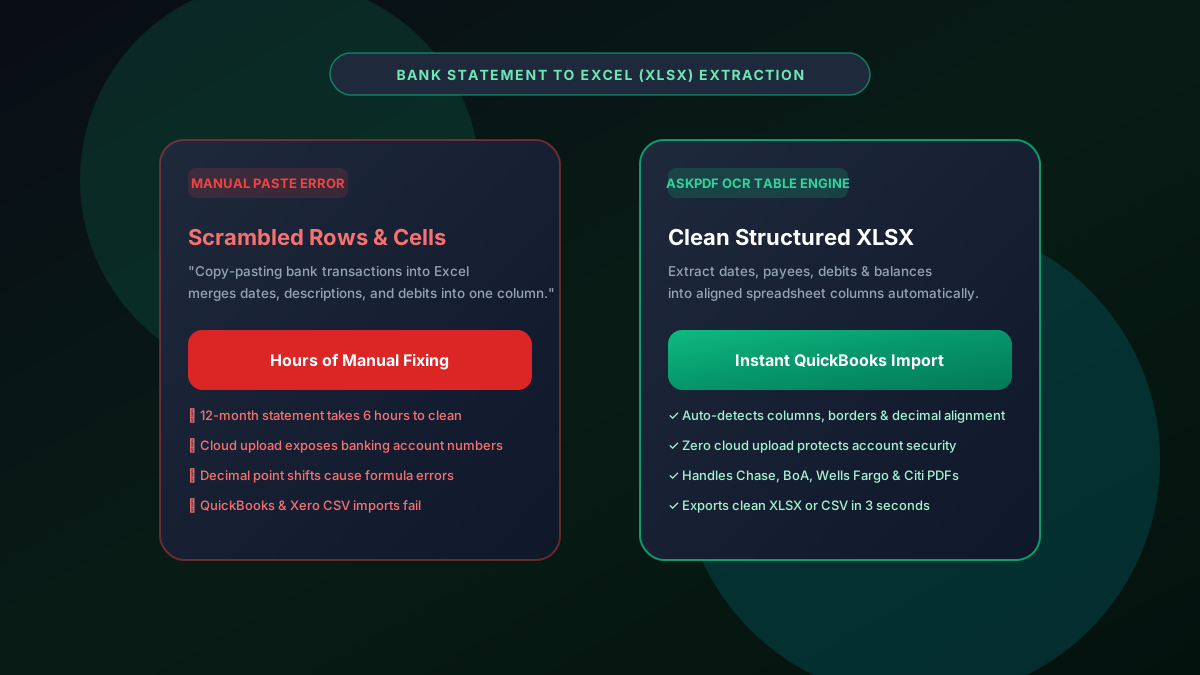
Copy-pasting bank transactions from PDF statements into Excel scrambles columns, merges dates and amounts, and wastes hours of manual data entry. Commercial OCR tools charge up to $60/month and upload sensitive bank account numbers to third-party cloud servers. AskPDF's Bank Statement to Excel Converter uses client-side machine vision to automatically detect table gutters, align credit/debit columns, and export calculation-ready XLSX and CSV spreadsheets in seconds—running 100% locally in your browser with zero data retention.
| Bank Statement Feature | Manual Copy-Paste / Cloud Tools | AskPDF Bank to Excel Engine |
|---|---|---|
| Table Layout & Column Alignment | Scrambled rows & merged amount cells | Precise date, description, debit & credit columns |
| Financial Privacy & Account Numbers | Statements uploaded to external servers | 100% In-Browser (Zero Cloud Upload) |
| QuickBooks & Xero Compatibility | Requires extensive manual reformatting | Ready for direct one-click accounting import |
| Multi-Page Statement Support | Paywalls after 3 pages ($30-$60/mo) | Unlimited pages & statements 100% free |
| Major Bank Template Recognition | Fails on irregular bank headers | Auto-detects Chase, BoA, Wells Fargo & Citi layouts |
Core Takeaway: Copy-pasting bank statements ruins mathematical accuracy. AskPDF reconstitutes transaction tables into clean, structured Excel worksheets with complete privacy directly on your device.
Convert Your Bank Statements to Excel Now
Turn multi-page Chase, BoA, or Wells Fargo PDF statements into clean spreadsheets in seconds.
Why Copy-Pasting PDF Bank Statements Breaks in Excel
PDFs are fundamentally visual print containers designed to fix text at specific X/Y coordinate positions on a digital canvas. They do not store underlying HTML or XML table tags.
When you highlight a bank statement table and paste it into Excel, the operating system clipboard treats spaces as irregular delimiters, collapsing transaction dates, payee strings, and withdrawal amounts into chaotic single-line entries.
Paid cloud converters charge exorbitant per-page rates and expose confidential banking account numbers and balances to third-party databases.
The Best Tested Free Alternatives (Ranked & Reviewed)
AskPDF Bank Suite
100% Private (Recommended)In-browser WebAssembly table recognition engine engineered specifically for financial bank statements and accounting ledgers.
Commercial Cloud OCR Sites
Expensive Subscription ($30-$60/mo)Web services like DocuClipper or Tabula requiring monthly recurring subscriptions.
Manual Copy-Paste
Error-Prone & SlowManually copying text lines and typing numbers into Excel.
How to Convert PDF Bank Statements into Excel
Select Bank Statement PDF
Drag and drop your multi-page bank statement (Chase, BoA, Wells Fargo, etc.) into AskPDF.
Automatic Table Detection
AskPDF's machine vision isolates the transaction grid, identifying date columns, payee text, and numerical amounts.
Download Clean Excel (XLSX)
Download your structured spreadsheet and open directly in Excel, Google Sheets, or import into QuickBooks.
Heuristic Gutter Recognition and Numerical Alignment
Financial tables present subtle structural challenges: payees with multi-line text descriptions, currency symbols, and varying decimal places.
AskPDF uses heuristic spatial projection algorithms that calculate vertical whitespace density across all pages, detecting virtual column gutters and preventing multi-line merchant descriptions from spilling into adjacent monetary fields.
Frequently Asked Questions
Q:Why does copy-pasting tables from PDF bank statements break in Excel?
PDFs store text as visual absolute coordinates (X/Y coordinates on a canvas) rather than structured table rows and cells. When copied manually, clipboard parsers merge transaction dates, payee descriptions, and amounts into chaotic single-line text blobs.
Q:How does AskPDF accurately convert bank statement tables into Excel columns?
AskPDF uses client-side machine vision algorithms that detect tabular column gutters, horizontal dividers, and numerical alignments, reconstituting transactions into pristine, calculation-ready Excel (.xlsx) and CSV grids.
Q:Is it safe to convert bank statements containing account numbers with AskPDF?
Yes, 100%. AskPDF operates strictly within your local browser's memory via WebAssembly. Your account numbers, balances, and financial transaction histories are never uploaded to any remote server or stored in a database.
Q:Which major banks are supported for PDF to Excel conversion?
AskPDF supports statements from all major international and regional institutions including Chase, Bank of America, Wells Fargo, Citibank, HSBC, Barclays, Capital One, and credit unions.
Q:Can I directly import the converted Excel or CSV file into QuickBooks or Xero?
Yes. AskPDF outputs standard Date, Description, Debit, Credit, and Balance columns formatted specifically for direct one-click import into QuickBooks Online, Xero, Sage, and Excel.
Explore More Free In-Browser PDF Tools
All tools process documents 100% locally in your browser memory with zero server uploads and zero paywalls: