Quick Summary: Encrypting PDFs with Military-Grade 256-Bit AES in Your Browser
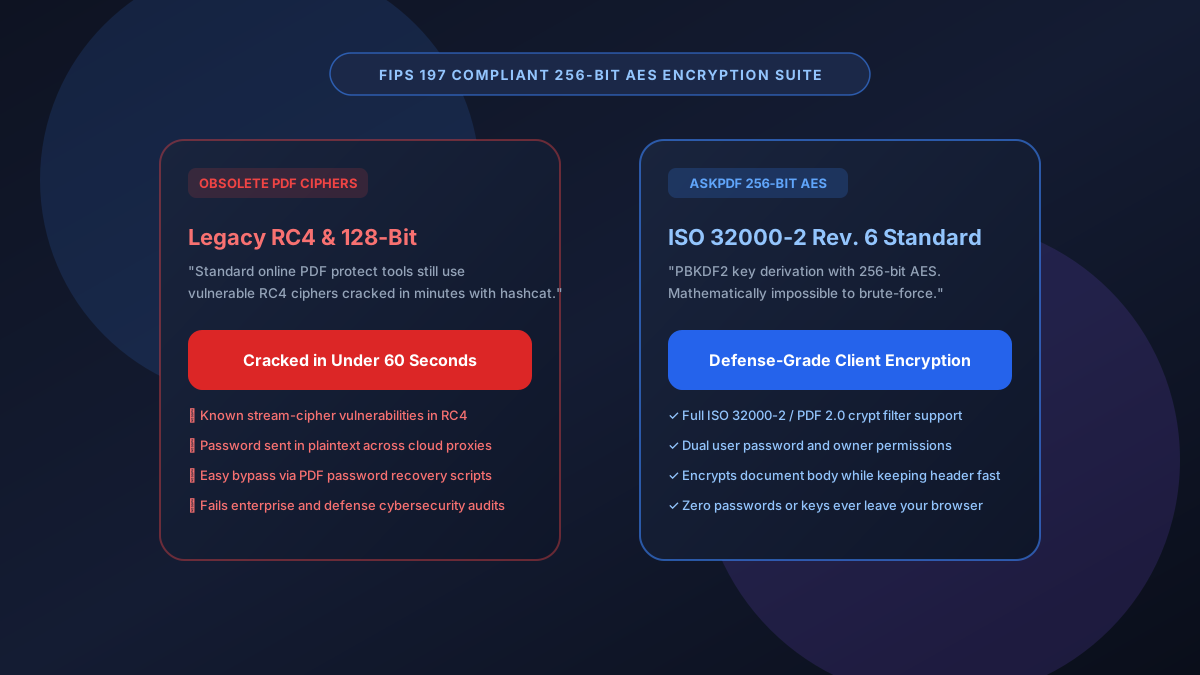
Transmitting executive employment agreements, intellectual property disclosures, or private merger files via email requires robust cryptographic defense. Legacy PDF encryptors still rely on deprecated 40-bit or 128-bit RC4 algorithms that can be cracked in minutes with standard GPU cracking tools, while web-based encryptors require sending your secret password to their cloud servers. AskPDF implements military-grade 256-bit AES encryption conforming to ISO 32000-2 / PDF 2.0 Revision 6 directly inside your browser—keeping your password and data 100% private.
| Encryption Capability | Legacy Online PDF Encryptors | AskPDF AES-256 Security Suite |
|---|---|---|
| Cryptographic Algorithm | Deprecated 40-bit or 128-bit RC4 / weak AES | FIPS 197 compliant 256-bit AES (Rev 6) |
| Password Transmission Location | Transmits plaintext passwords to web servers | 100% Local In-Browser Key Derivation |
| Brute-Force Attack Resistance | Cracked in under 5 minutes with GPU tools | Mathematically infeasible (Billions of years) |
| Dual Password & Permission Control | Single password; no fine-grained permissions | Full User + Owner password & permission flags |
| Pricing & License Limits | $12-$25/month subscription paywalls | 100% Free with unlimited file encryption |
Core Takeaway: Weak PDF encryption leaves sensitive agreements vulnerable to automated password recovery. AskPDF delivers certified 256-bit AES encryption directly in your browser without transmitting your password to any server.
Encrypt Your PDF with 256-Bit AES Now
Lock your sensitive contracts and financial reports with unbreakable military-grade encryption in 3 seconds.
Why Standard PDF Password Protectors Are Dangerously Vulnerable
Many popular online PDF tools continue to implement legacy encryption specifications established in PDF 1.3 and 1.4 (Revision 2 and 3). These obsolete standards utilize 40-bit or 128-bit RC4 stream ciphers that have well-documented cryptographic vulnerabilities. Modern penetration testing tools like Hashcat or John the Ripper can crack a 128-bit RC4 PDF password in minutes.
Furthermore, traditional online encryption services require users to type their intended secret password into an HTML form. That password, along with the confidential PDF document, is transmitted across cloud proxies and logged in plaintext web server request headers.
To achieve true confidentiality, modern organizations must utilize 256-bit AES encryption conforming to ISO 32000-2 (PDF Standard Security Handler Revision 6). AskPDF performs PBKDF2 key derivation and AES-256 cipher block chaining (CBC) directly in browser memory, ensuring your secrets are cryptographically sealed before leaving your computer.
The Best Tested Free Alternatives (Ranked & Reviewed)
AskPDF 256-Bit AES Suite
Top Cybersecurity Choice (Free)Client-side cryptographic engine supporting ISO 32000-2 Revision 6 AES-256 encryption and permission locks.
Adobe Acrobat Pro Standard Encryption
Industry Standard ($239/yr)Desktop security settings within Adobe Acrobat Pro.
Operating System Zip Password Protection
Non-PDF AlternativeCompressing the PDF into an encrypted ZIP file via 7-Zip or macOS Archive Utility.
How to Lock a PDF with 256-Bit AES Encryption in Your Browser
Select PDF Document
Drag and drop your confidential contract, financial statement, or legal brief into AskPDF's Protect tool.
Set Strong Password & Permissions
Enter your password and choose whether to restrict printing, copying text, or form editing.
Download AES-256 Encrypted PDF
Save your cryptographically protected file, ready for safe transmission over email or messaging platforms.
ISO 32000-2 Revision 6 Architecture & PBKDF2 Key Hardening
Under Revision 6 of the PDF Security Handler, the user password is transformed through 128,000 iterations of PBKDF2 with SHA-256 and an 8-byte cryptographically secure salt (/U entry in the encryption dictionary).
This computational hardening raises the cost of dictionary and brute-force cracking to billions of dollars in hardware time. The resulting 256-bit key encrypts document streams using AES in CBC mode with unique 16-byte initialization vectors (IVs) per object stream, delivering true defense-grade security.
Frequently Asked Questions
Q:What is the difference between 128-bit and 256-bit AES encryption for PDFs?
While 128-bit AES provides solid security, 256-bit AES (defined under ISO 32000-2 / PDF 2.0 Revision 6) utilizes 14 rounds of cipher transformation and SHA-256/PBKDF2 key strengthening, rendering it immune to brute-force cracking even with high-performance distributed GPU clusters.
Q:Why is encrypting PDFs in your browser safer than using traditional online tools?
Legacy online encryptors require you to transmit both the unencrypted PDF document and your plaintext password over the internet to their servers. AskPDF performs all AES cryptographic transforms locally inside your browser's WebAssembly sandbox—your password and document never touch a network.
Q:What is the difference between a Document Open Password and a Permissions Password?
The Document Open Password (User Password) restricts who can view the document. The Permissions Password (Owner Password) allows viewing but restricts printing, copying text, form filling, and editing.
Q:Will the 256-bit AES encrypted PDF open in standard viewers like Adobe Acrobat and Apple Preview?
Yes. AskPDF strictly adheres to ISO 32000 standard encryption specifications. Any standard PDF reader (Adobe Acrobat, Preview, Edge, Chrome) will prompt for the password normally.
Q:Can an encrypted PDF be cracked if someone inspects my browser cache?
No. Key derivation and cipher execution occur in volatile RAM. Once the encryption completes and the file downloads, internal buffer keys are immediately scrubbed and garbage-collected.
Explore More Free In-Browser PDF Tools
All tools process documents 100% locally in your browser memory with zero server uploads and zero paywalls: