Quick Summary: Extracting SEC 10-K & 10-Q Balance Sheets to Excel for Financial Modeling
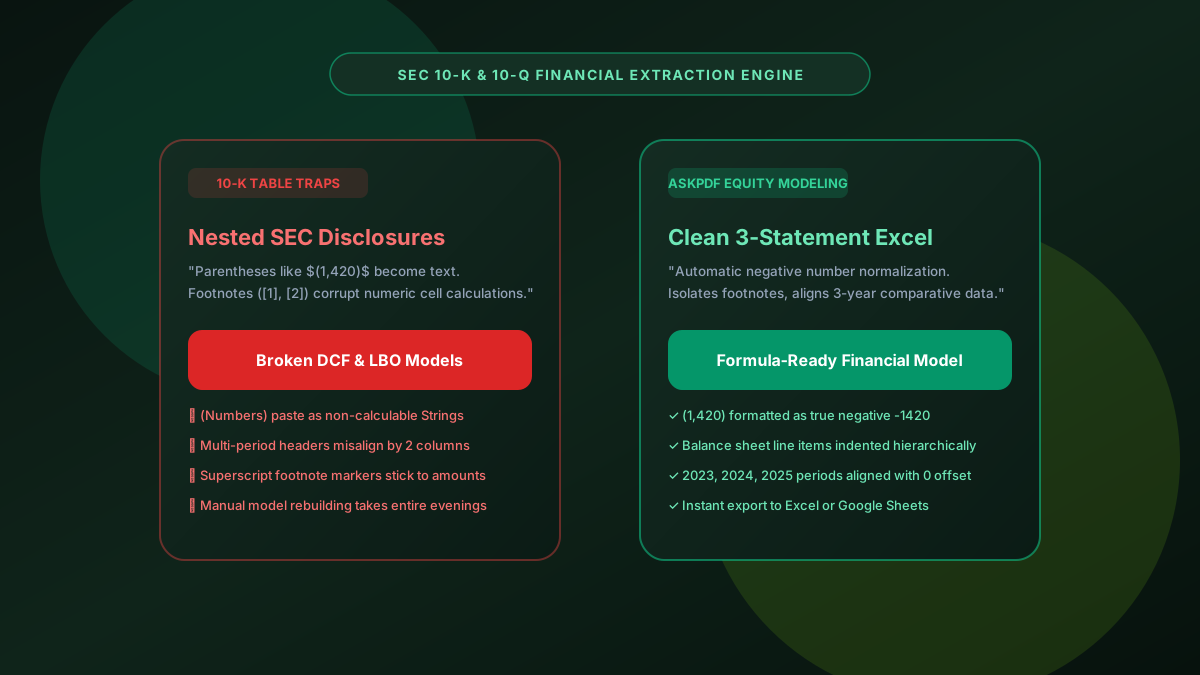
Financial analysts and investment bankers frequently need to transfer SEC Form 10-K and 10-Q financial statements into Excel DCF and LBO valuation models. However, standard PDF copies break because SEC filings use parenthetical negative numbers (e.g., $(2,450)$), hierarchical line-item indentations, and superscript footnote tags ([1], [2]) that turn spreadsheet numbers into uncalculable text strings. AskPDF's SEC Extractor parses accounting typography locally, delivering formula-ready Excel tables with properly normalized negative values, aligned multi-year periods, and preserved line-item hierarchy.
| SEC Extraction Feature | Manual Copy-Paste / Web Converters | AskPDF SEC Financial Suite |
|---|---|---|
| Negative Parentheses Handling | Pasted as text strings like '(1,450)', breaking SUM() | Normalized to true negative numeric values (-1450) |
| Multi-Year Period Alignment | 2024, 2023, and 2022 columns shift and misalign | Exact column coordinate alignment for comparative years |
| Hierarchical Indentation | All line items flattened to the left margin | Preserves sub-category indentation for clean modeling |
| Footnote Tag Separation | Superscripts stick to numbers (e.g., '$1,2001') | Isolates footnote references from financial amounts |
| M&A / Deal Room Privacy | Transmits confidential filings to third-party clouds | 100% In-Browser (Zero Cloud Upload) |
Core Takeaway: SEC 10-K filings require specialized accounting syntax parsing for parenthetical negatives and hierarchical line items. AskPDF delivers clean, formula-ready three-statement models without data leakage.
Extract SEC 10-K Financial Statements to Excel
Pull clean Balance Sheets, Income Statements, and Cash Flow tables into Excel models in seconds.
Why SEC 10-K Filings Wreak Havoc on Standard Spreadsheet Pastes
SEC Form 10-K annual reports and 10-Q quarterly reports are crafted according to rigorous GAAP and IFRS financial reporting standards. To convey sophisticated financial hierarchies, these documents employ specialized typography: accounting parentheses for negative values and cash outflows (e.g., `$(4,120)`), indented child line items (e.g., 'Cash and cash equivalents' nested beneath 'Current assets'), and superscript numbers linking to extensive disclosure footnotes.
When an equity research associate or corporate finance analyst copies these tables directly from EDGAR PDF filings into Excel, the spreadsheet treats parenthetical figures as non-numeric strings rather than negative integers. Any formula referring to those cells immediately throws `#VALUE!` errors.
Furthermore, footnote superscript tags often stick to the adjacent dollar amount—turning a `$450` million revenue figure with footnote 1 into `$4501` million, introducing massive valuation errors into financial models unless tediously corrected by hand.
The Best Tested Free Alternatives (Ranked & Reviewed)
AskPDF SEC Financial Extractor
Analyst Recommended (Free)Zero-upload financial layout parser that normalizes SEC filing conventions into formula-ready Excel tables.
Bloomberg Terminal / FactSet Add-ins
Enterprise Standard ($25,000+/yr)Institutional financial data feeds with built-in Excel formulas and fundamental statement history.
Manual Re-keying into Financial Models
Labor IntensiveTyping balance sheet and cash flow figures line-by-line into valuation templates.
How to Extract SEC 10-K Balance Sheets into Clean Excel Models
Select SEC 10-K or 10-Q PDF
Drag and drop the annual report or quarterly filing PDF into AskPDF's Table Extractor.
Automated Financial Syntax Parsing
AskPDF detects parenthetical negatives, isolates footnote markers, and aligns comparative fiscal periods.
Download Clean Valuation Spreadsheet
Open the formatted XLSX workbook and immediately link line items into your DCF, LBO, or 3-statement model.
Accounting Typography Normalization & Hierarchical Indentation Heuristics
AskPDF incorporates an accounting syntax grammar that interprets parenthetical notation `(X)` and negative dashes `—` as algebraic negatives (`-X` and `0.00`). Cell data types are explicitly cast as floating-point numbers with standard Excel accounting number formatting `_($* #,##0_);_($* (#,##0);_($* "-"_);_(@_)`.
To preserve the logical taxonomy of financial statements, the parser calculates the left-margin delta (`Δx`) of line item labels relative to section headers (such as 'Assets' vs 'Current assets' vs 'Accounts receivable'). This delta is translated directly into cell indentation levels in Excel, maintaining clear visual hierarchy for senior financial reviewers.
Frequently Asked Questions
Q:Why do SEC 10-K and 10-Q financial statements break when copied into Excel?
SEC filing PDFs feature complex multi-period columns (e.g., Dec 31 2024 vs Dec 31 2023), indented hierarchical line items (Current Assets vs Total Assets), negative amounts enclosed in parentheses like $(1,420)$, and superscript footnote references. Copy-pasting treats parentheses and footnotes as text strings, destroying Excel formulas.
Q:How does AskPDF format negative financial figures in parentheses?
AskPDF parses accounting conventions, converting numbers enclosed in parentheses (e.g., (4,520)) into true negative numeric values (-4520) with standard Excel accounting display formatting so DCF, LBO, and three-statement models calculate accurately.
Q:Does AskPDF preserve line-item indentations in Balance Sheets and Income Statements?
Yes. Indented subsection items (such as Cash and Cash Equivalents under Current Assets) maintain their hierarchical indentation spacing in Excel, preserving the visual and logical structure of the financial filing.
Q:Can I extract comparative 3-year income statements with zero column misalignment?
AskPDF uses horizontal coordinate clustering to align each fiscal year's column independently, ensuring that 2023, 2024, and 2025 numbers line up under their respective fiscal period headers.
Q:Is AskPDF secure for private pre-release earnings filings and M&A data rooms?
Absolutely. AskPDF processes all documents strictly client-side inside your browser sandbox. Confidential merger valuation files and private draft filings are never transmitted over the internet.
Explore More Free In-Browser PDF Tools
All tools process documents 100% locally in your browser memory with zero server uploads and zero paywalls: