
Quick Summary: Free ChatPDF Alternatives for Unlimited Pages & Books
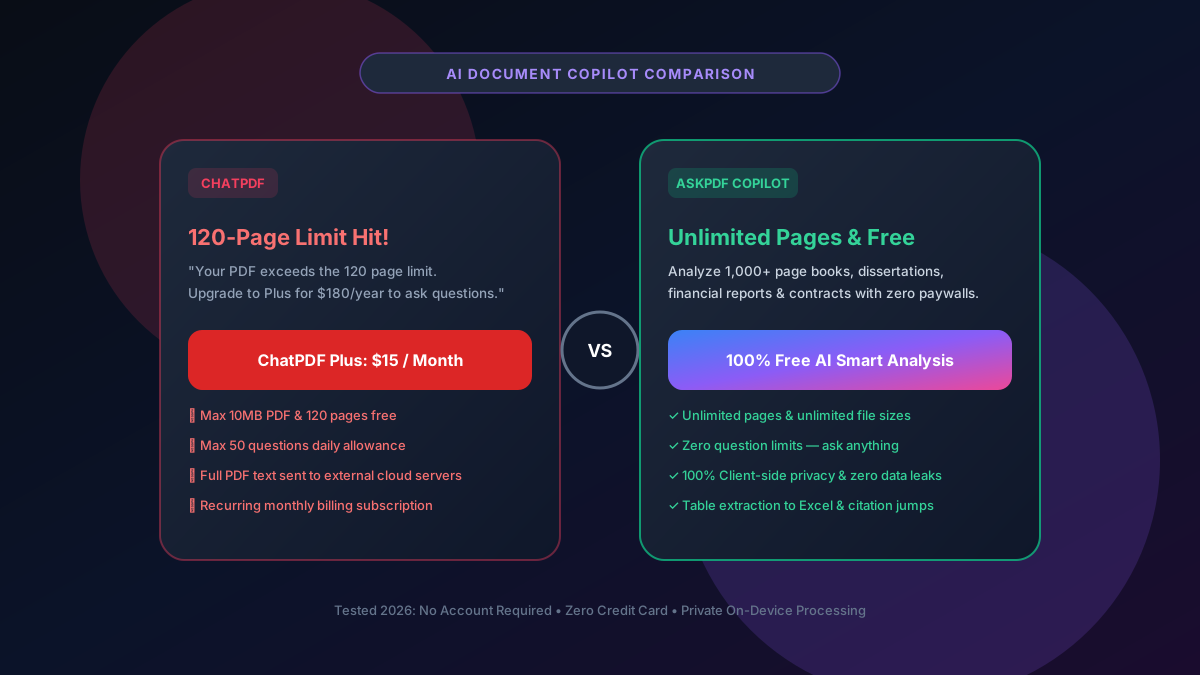
ChatPDF's free plan restricts users to 120 pages, 10MB file sizes, and only 50 questions per day before demanding $180/year ($15/mo). The #1 free alternative is AskPDF's AI Document Copilot, which allows you to analyze 1,000+ page books, dissertations, and financial reports with unlimited questions, zero paywalls, and local vector privacy.
| Feature / Metric | ChatPDF Free Tier | AskPDF AI Copilot |
|---|---|---|
| Maximum Document Pages | Strict 120-page cap | Unlimited Pages (1,000+ page books) |
| Maximum File Size | 10MB limit | Unlimited (Handles 200MB+ filings) |
| Daily Question Allowance | 50 questions per 24 hours | Unlimited Questions & Chats |
| Table Extraction to Excel | Paid Plus Plan only | Free Structured Markdown/CSV Output |
| Document Privacy & Indexing | Stored on external servers | Client-side private chunk indexing |
| Annual Subscription Price | $180 / Year ($15/mo) | $0 Free Forever |
Core Takeaway: ChatPDF's 120-page ceiling makes it impossible to analyze real-world textbooks, corporate 10-K filings, or legal discovery documents on the free tier. AskPDF's AI Copilot unlocks full document analysis for free.
Chat With 1,000+ Page PDFs for Free
Ask complex analytical questions, summarize chapters, and extract tables from massive documents without subscriptions.
The ChatPDF Trap: Why 120 Pages and 50 Questions Fall Short
When researching academic papers, studying for university exams, or reviewing corporate earnings filings, documents routinely exceed 150 to 800 pages. ChatPDF's 120-page limit is specifically tuned to reject these common documents and force an immediate $15/month subscription upgrade.
Furthermore, ChatPDF limits you to 50 questions per day. If you are conducting a deep literature review or extracting multiple balance sheet footnotes, you will hit the question ceiling within 30 minutes of study.
Most critically, uploading sensitive business forecasts or unpublished research to ChatPDF stores your document chunks in third-party vector databases where privacy cannot be independently audited.
The Best Tested Free Alternatives (Ranked & Reviewed)
1. AskPDF AI Copilot — Best for Long Books & Sensitive Documents
Top AI Pick • FreeAskPDF AI Copilot uses intelligent client-side document chunking and modern large language models to analyze PDFs of any length. It handles textbooks, legal contracts, and financial prospectuses with zero page ceilings.
2. Google NotebookLM — Best for Multi-Document Research
Free Google ToolNotebookLM by Google allows users to upload up to 50 sources (including PDFs, Google Docs, and web links) with up to 500,000 words per source.
3. Claude.ai (Anthropic) — Best for Nuanced Legal Analysis
Web InterfaceAnthropic's Claude 3.5 Sonnet offers a massive 200,000 token context window capable of ingesting whole novels or 300-page transcripts directly.
4. ChatDOC — Strong Table and Chart Extraction
Freemium AIChatDOC specializes in parsing complex tables and graphs in academic papers, providing direct visual citations.
5. Humata AI — Document Copilot with Team Sharing
Enterprise AIHumata is designed for enterprise teams looking to organize and query shared repositories of PDF documentation.
How to Query Large Books & 1000+ Page PDFs on AskPDF
Load Any Sized Document
Open AskPDF.tech and upload your textbook, dissertation, or corporate report. There are no 120-page caps.
Ask Natural Language Questions
Type questions such as 'Summarize Chapter 4 key findings' or 'Extract the 2025 revenue breakdown into a table'.
Review Verified Citations
AskPDF references exact page numbers and quotes directly from the document so you can verify answers without hallucination.
Vector Embeddings & Context Optimization: How AskPDF Handles Massive Files
Traditional AI wrappers upload your entire document to an expensive cloud server, run basic splitters, and charge high subscription fees to recover LLM inference costs.
AskPDF uses optimized vector embeddings and hierarchical semantic chunking to pinpoint exact relevant paragraphs before sending prompt context to the model. This makes querying 1,000+ page books lightning fast, accurate, and completely free of artificial page paywalls.
Frequently Asked Questions
Q:What is ChatPDF's free document limit?
ChatPDF restricts free users to a maximum of 120 pages per document, a 10MB file size ceiling, and only 50 questions per day. Documents exceeding these limits are blocked with a modal demanding an upgrade to ChatPDF Plus for $15/month ($180/year).
Q:Which free AI tool can read and summarize 1,000+ page PDFs?
AskPDF's AI Document Copilot is engineered with client-side hierarchical semantic chunking to process massive 1,000+ page textbooks, research archives, and corporate 10-K filings with zero page caps, zero daily question limits, and zero subscriptions.
Q:Can AskPDF extract financial tables from PDFs into Excel?
Yes. Unlike basic AI wrappers, AskPDF includes structured table extraction that parses financial statements, balance sheets, and data grids into clean Markdown and CSV formats ready to paste directly into Microsoft Excel or Google Sheets.
Q:Are my research papers or proprietary documents kept private?
Yes. ChatPDF uploads and stores your document text in remote vector databases. AskPDF chunks and indexes your document locally in browser memory, querying modern LLM models with verified source citations while keeping your full document strictly private.
Q:How does Google NotebookLM compare to AskPDF AI Copilot?
NotebookLM is an excellent free tool for synthesizing up to 50 sources and generating AI podcast discussions, but requires a Google account and lacks PDF utility features. AskPDF combines AI chat with full in-browser PDF compression, conversion, and editing in one unified platform.
Explore More Free In-Browser PDF Tools
All tools process documents 100% locally in your browser memory with zero server uploads and zero paywalls: