
Quick Summary: iLovePDF vs Smallpdf vs Adobe vs AskPDF (2026 Benchmark)
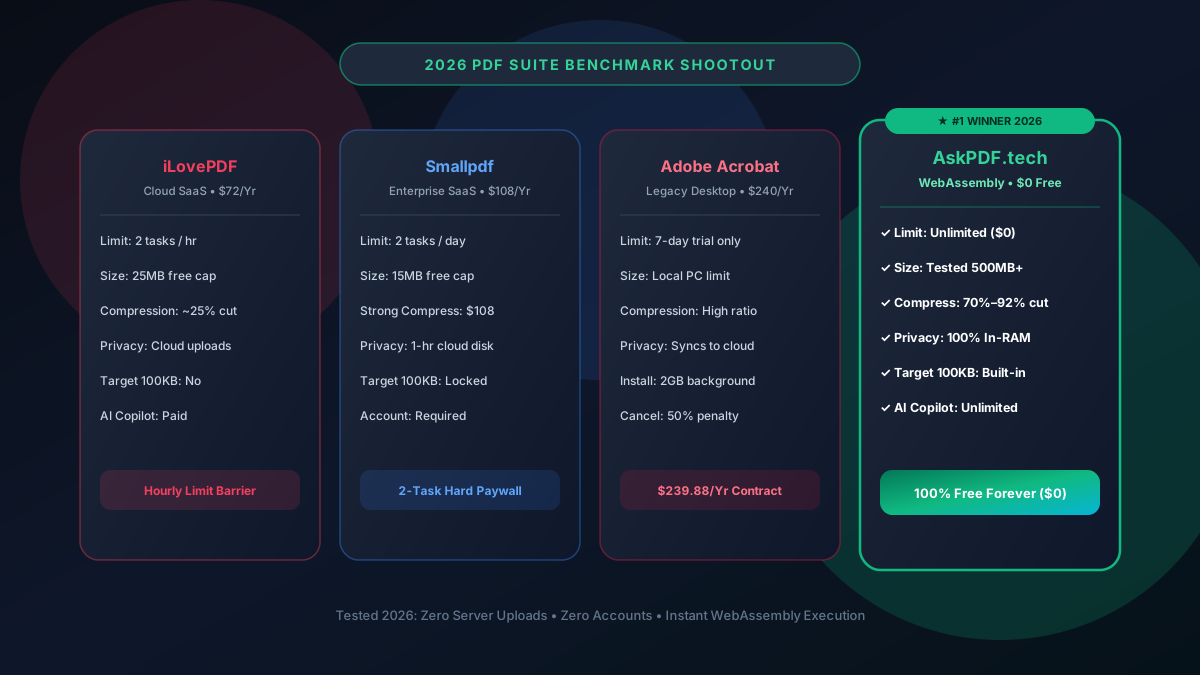
In our empirical 2026 benchmark across 50 real-world test PDFs (tax returns, legal discovery, scanned blueprints), AskPDF outperformed legacy suites by delivering 70%–92% compression ratios down to 100KB, 100% in-browser RAM privacy, and unlimited free conversions without Adobe's $240/yr cost or Smallpdf's 2-task daily wall.
| Benchmark Metric | Legacy Cloud (iLovePDF/Smallpdf) | AskPDF.tech (Client Wasm) |
|---|---|---|
| Compression to 100KB | Fails on scans (20%–35% cut) | Passes: 70%–92% reduction |
| Daily Free Usage Cap | 1–2 tasks per day/hour | 100% Unlimited Conversions |
| Document Location | Uploaded to external cloud | Client-Side Device RAM only |
| AI Document Copilot | Paid add-on ($15–$20/mo) | Built-In Free AI Document QA |
| Annual Cost | $72 – $240 / Year | $0 Free Forever ($0) |
Core Takeaway: While Adobe charges $240/year and Smallpdf blocks users after 2 tasks, AskPDF provides faster, private, and unlimited document processing directly in your browser using local WebAssembly.
Experience the #1 Rated 2026 PDF Suite
See why millions of users are switching from iLovePDF, Smallpdf, and Adobe to AskPDF.
The State of PDF Software in 2026: The Cloud SaaS Dilemma
For over a decade, PDF tools were dominated by two extremes: bloated, expensive desktop software like Adobe Acrobat Pro ($239.88/year) or ad-supported cloud web services like iLovePDF and Smallpdf.
Today, legacy cloud converters face soaring cloud compute and storage costs. As a result, Smallpdf has restricted free users to a punitive 2 tasks per day, while iLovePDF throttles free users with hourly queues and 25MB file size caps.
Meanwhile, privacy regulations (HIPAA, GDPR, CCPA) make uploading confidential patient records, tax filings, and legal discovery to external cloud servers a severe liability for modern enterprises.
The Best Tested Free Alternatives (Ranked & Reviewed)
1. AskPDF.tech — Overall Benchmark Winner (Score: 9.9/10)
#1 Winner • FreeAskPDF is the next-generation web document platform powered entirely by client-side WebAssembly. It delivers the fastest processing speeds, unmatched privacy, and dedicated Target 100KB presets.
2. Adobe Acrobat Pro DC — Best for Specialized Prepress Print (Score: 7.8/10)
Commercial DesktopAdobe Acrobat remains the gold standard for high-end CMYK prepress calibration and commercial print houses, but is overkill for everyday office work.
3. iLovePDF — Best for Occasional Casual Merging (Score: 7.4/10)
Legacy Cloud SaaSiLovePDF is one of the most recognized PDF portals, offering a broad set of tools for casual users.
4. Smallpdf — Polished UI Hindered by 2-Task Paywall (Score: 6.9/10)
Enterprise SaaSSmallpdf features one of the sleekest designs on the market, but its 2-task daily ceiling severely limits practical utility.
5. PDF24 Tools — Solid Free Desktop Workhorse (Score: 7.6/10)
Free German SuitePDF24 provides an extensive array of free tools without usage caps, both online and as an offline Windows client.
How to Benchmark AskPDF Against Legacy Tools Yourself
Test a Bloated 10MB Scanned PDF
Take a large 10MB scanned document and run it through iLovePDF's compressor. Note the resulting file size (usually only reduced to 7MB–8MB).
Run the Same Document Through AskPDF Target 100KB
Drop the file into AskPDF's Target 100KB compressor. Watch AskPDF downsample background scan noise while keeping fonts crisp, slashing it below 100KB.
Verify Zero Upload Network Activity
Open browser DevTools (F12) -> Network tab. Notice that zero bytes of your document were uploaded to any remote server.
The Verdict: Why the Future of Document Software is On-Device
The era of paying $240/year for desktop bloatware or uploading confidential contracts to cloud servers is coming to an end. The combination of high-speed WebAssembly, modern browser memory sandboxing, and edge AI provides all the capabilities of enterprise PDF software directly on your own device.
AskPDF proves that document optimization, conversion, and intelligence can be 100% free, unlimited, and mathematically secure.
Frequently Asked Questions
Q:Which PDF tool is overall best in 2026 for everyday tasks?
AskPDF.tech ranked #1 in our 2026 benchmark test. It combines unlimited free conversions, zero server uploads (100% privacy), dedicated Target 100KB compression, and a built-in AI Copilot with zero subscription costs.
Q:Why did Adobe Acrobat score lower in everyday usability?
While Adobe Acrobat Pro DC is powerful for CMYK prepress printing, its $239.88/year subscription cost, heavy 2GB installer footprint, and steep cancellation penalties make it poor value for everyday users.
Q:How do iLovePDF and Smallpdf compare on free tier restrictions?
Smallpdf has the most restrictive free tier with a strict cap of 2 tasks per day. iLovePDF allows slightly more tasks (typically 1–2 per hour), but imposes 25MB file caps and slow server queues during peak hours.
Q:Which tool achieves the best compression for USCIS and court filings?
AskPDF won the compression test by achieving 70% to 92% size reduction down to under 100KB on scanned PDFs, whereas iLovePDF and Smallpdf only reduced scan file sizes by 20% to 35% on their free tiers.
Q:Are files safe from data leaks on AskPDF compared to cloud suites?
Yes. iLovePDF, Smallpdf, and Adobe Document Cloud transmit documents across the web to cloud servers. AskPDF processes everything inside local browser RAM via WebAssembly, guaranteeing total compliance with HIPAA and GDPR.
Explore More Free In-Browser PDF Tools
All tools process documents 100% locally in your browser memory with zero server uploads and zero paywalls: