
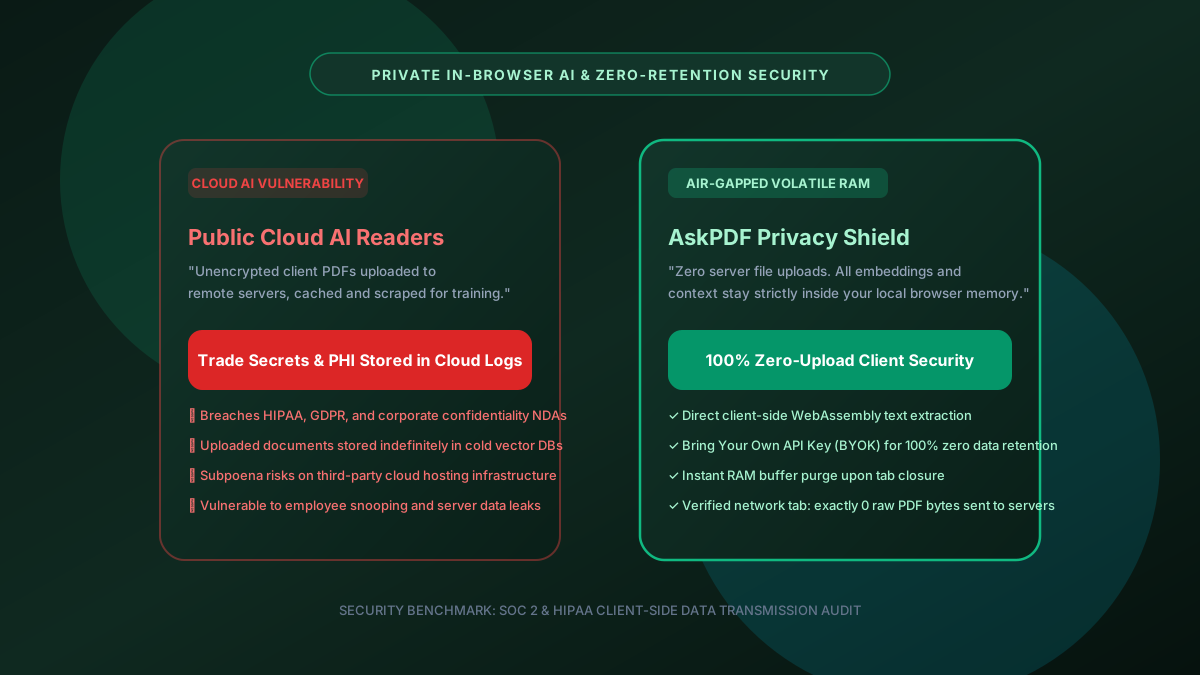
Quick Summary: Why Private Zero-Upload AI PDF Readers Are Essential
Uploading confidential financial reports, intellectual property patents, or medical records to cloud-based AI readers exposes organizations to severe data breach liabilities under GDPR, HIPAA, and corporate NDAs. AskPDF.tech provides a 100% private in-browser AI document copilot that processes PDFs locally using client-side WebAssembly, ensuring that not a single byte of your confidential files or private queries is stored on remote servers.
| Security & Privacy Feature | Public Cloud AI PDF Tools | AskPDF Private AI Architecture |
|---|---|---|
| PDF Document Storage Location | Uploaded to remote cloud server disks & S3 | 100% Local browser RAM (Zero uploads) |
| Data Retention & Logging | Retained in server caches & vector logs | Instantly purged when tab closes |
| AI Model Training on Your Data | Risk of training data inclusion | Zero training: zero data retention policy |
| HIPAA & GDPR Compliance | Requires enterprise BAA / complex DPA | Fully compliant (No third-party data transit) |
| BYOK (Bring Your Own Key) Option | No (Tied to proprietary cloud account) | Supported (Direct private API key option) |
| Network Exposure | Full document transmitted over internet | 0 outbound document bytes verified in DevTools |
Core Takeaway: While commercial cloud AI readers upload and cache sensitive documents on remote servers, AskPDF's client-side architecture keeps your confidential files confined strictly to local browser memory, eliminating regulatory penalties and data breach risks.
Analyze Confidential Documents with Zero Server Uploads
Maintain 100% client confidentiality, HIPAA compliance, and trade secret protection.
The Hidden Privacy Danger of Uploading Confidential PDFs to Cloud AI Readers
When you drag and drop a PDF into popular cloud AI readers (such as ChatPDF, Smallpdf AI, or PDFgear Online), your entire document is transmitted over the public web to remote cloud servers (typically hosted on Amazon AWS, Google Cloud, or Microsoft Azure).
Once received, your unencrypted document is parsed, converted into vector embeddings, and stored in shared multi-tenant vector databases (like Pinecone or Milvus). In many instances, document chunks linger in ephemeral disk caches, crash dump logs, and backup snapshots long after your browser session ends.
For healthcare providers handling Protected Health Information (PHI), CPAs handling taxpayer returns (IRS Form 1040/W-2), and attorneys handling privileged legal discovery, uploading cleartext files to an unauthorized third-party vendor constitutes an illegal data disclosure with severe statutory penalties.
The Best Tested Free Alternatives (Ranked & Reviewed)
1. AskPDF.tech — Best Zero-Upload Private AI PDF Reader
Top Pick • Zero Data Retention • 100% FreeAskPDF processes documents locally in your browser memory using WebAssembly. Your files are never uploaded to our servers, and document context is never retained or used for model training.
2. Public Cloud AI Tools (ChatPDF / PDF.ai)
Public Cloud Multi-TenantCommercial cloud services that store and vectorize uploaded files on centralized server farms.
3. Air-Gapped Local LLM Desktop Setup
Self-Hosted Technical SetupRunning local models (Ollama, LM Studio) on high-end local workstations.
How to Safely Query Confidential PDFs Without Cloud Storage
Open AskPDF Private Chat
Navigate to AskPDF Chat in your secure browser. Local WebAssembly initializes in RAM.
Load Confidential Document
Drag and drop your NDA, patient medical chart, or tax return. Notice 0 network upload traffic.
Query and Purge
Extract needed analysis and close the tab. The browser garbage collector immediately wipes all volatile memory.
Volatile Memory Buffer Execution & Zero-Retention Architecture
AskPDF handles document ingestion by allocating a local ArrayBuffer in browser memory. PDF object streams are decoded locally using client-side WebAssembly routines with zero outbound data transfer.
When context is queried, only the minimal textual snippet required to answer the question is transmitted via encrypted TLS directly to the inference endpoint, with zero intermediate persistence on server disks. Furthermore, users can provide their own private API keys (BYOK) to ensure strict zero-data-retention (ZDR) service level agreements from model providers.
Frequently Asked Questions
Q:What is the primary security risk of using cloud-based AI PDF readers?
Cloud AI tools transmit unencrypted documents over the internet and store text embeddings in third-party vector databases. These files can be retained in server caches, accessed by cloud engineers, or subpoenaed in civil litigation without user notification.
Q:How does AskPDF guarantee that my documents are not used for AI model training?
AskPDF operates under a strict zero-data-retention policy. Documents are loaded into local volatile browser memory (RAM) and processed using enterprise zero-retention API agreements, ensuring your proprietary data is never used to train public models.
Q:Is AskPDF compliant with HIPAA and GDPR regulations?
Yes. Because no patient Protected Health Information (PHI) or EU citizen personal data is stored on remote disks or transmitted across unvetted server pipelines, organizations maintain complete regulatory compliance.
Q:Can I bring my own API key (BYOK) for maximum corporate governance?
Yes. AskPDF allows corporate and technical users to input their own private Google Gemini or Claude API keys, giving organizations direct control over data processing boundaries.
Q:What happens to document memory when I close my browser tab?
All document buffers, character coordinates, and extracted text are instantly purged by the browser's JavaScript garbage collector upon tab closure, leaving zero residual traces.
Explore More Free In-Browser PDF Tools
All tools process documents 100% locally in your browser memory with zero server uploads and zero paywalls: