
Quick Summary: Why Copy-Pasting PDF Tables Breaks in Excel & How to Fix It
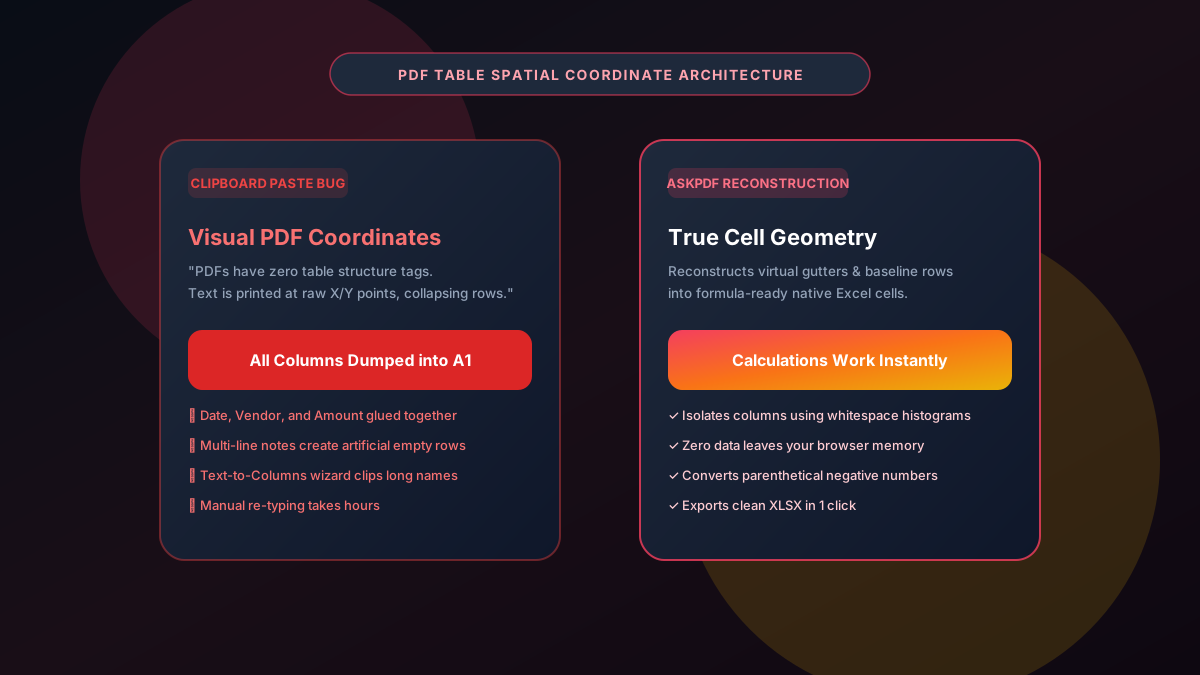
When you copy a table from a PDF and paste it into Microsoft Excel or Google Sheets, the entire dataset frequently dumps into Column A, mashes dates and dollar figures together, or creates hundreds of blank rows. This happens because the PDF standard has no native concept of tables or cells—it records text as isolated visual coordinate tokens. AskPDF's Table Extractor eliminates this headache by using computer-vision coordinate clustering to reconstruct true tabular grids, exporting clean native XLSX workbooks in seconds with 100% in-browser privacy.
| Extraction Method | Direct Clipboard Copy-Paste | AskPDF Table Reconstruction |
|---|---|---|
| Cell & Column Separation | Dumps entire rows into single cells in Column A | Exact column separation into native Excel cells |
| Currency & Number Formatting | Stored as unformatted plain strings | Formatted as true calculable numbers ($ and -) |
| Multi-line Cell Handling | Creates random ghost rows that ruin sorting | Merges multi-line descriptions into single rows |
| Formula Readiness (SUM, VLOOKUP) | Fails with #VALUE! and #N/A formula errors | Ready for immediate formulas and pivot tables |
| Client-Side Data Privacy | Relies on external cloud OCR servers | 100% In-Browser (Zero Cloud Upload) |
Core Takeaway: PDFs lack semantic table markup, which causes clipboard copies to collapse into Column A. AskPDF analyzes spatial X/Y coordinates locally to reconstruct clean, formula-ready Excel workbooks.
Stop Retyping PDF Tables Into Excel
Extract structured tables from any PDF into pristine, formula-ready spreadsheets in 3 seconds.
The Underlying Technical Reason Copy-Pasting PDF Tables Breaks
The Portable Document Format (PDF) was developed in 1993 as a digital print specification. Its primary design objective was visual fidelity across hardware platforms, not structured data interchange. Inside a PDF, there are no HTML-like <table>, <tr>, or <td> tags. Instead, a PDF page is a collection of absolute vector instructions, placing individual glyphs and text strings at fixed horizontal (X) and vertical (Y) point coordinates from the bottom-left origin.
When you highlight text on a PDF page and press Ctrl+C (or Cmd+C), your PDF reader's clipboard handler performs a naive linear text stream extraction. Because the reader cannot infer which visual gap corresponds to a table column boundary versus a simple inter-word space, it glues adjacent text fragments together or inserts arbitrary newline carriage returns.
When pasted into Excel, spreadsheet engines interpret line breaks as row delimiters and spaces as text, resulting in the dreaded 'all columns dumped into Column A' problem. Excel's built-in 'Text to Columns' wizard often exacerbates the damage by splitting multi-word vendor names and address fields across random columns, forcing finance and operations professionals to spend hours manually cleaning messy sheets.
The Best Tested Free Alternatives (Ranked & Reviewed)
AskPDF PDF Table Extractor
Recommended (Free & In-Browser)Zero-knowledge spatial layout parser that reconstructs genuine tabular grids directly inside your browser memory.
Excel Built-in 'Text to Columns' Wizard
Native Excel Tool (Fragile)Spreadsheet tool that separates text strings based on fixed widths or delimiter characters like commas or tabs.
Cloud-Based PDF Conversion SaaS
Subscription Paywalls ($15-$30/mo)Online conversion websites that upload your documents to third-party cloud servers for optical parsing.
How to Fix Broken PDF Tables and Export Clean Excel Spreadsheets
Select or Drop PDF File
Drag and drop your PDF containing financial tables, invoices, or reports into AskPDF's Table Extractor.
Spatial Coordinate Layout Parsing
AskPDF scans horizontal gutters and vertical baselines to reconstruct exact column boundaries in real time.
Download Clean Excel (.xlsx) File
Open your new spreadsheet in Microsoft Excel or Google Sheets with fully separated columns, ready for instant calculations.
Spatial Gutter Analysis & Baseline Coordinate Clustering
AskPDF solves the clipboard extraction flaw by abandoning naive linear text streams in favor of two-dimensional spatial coordinate clustering. When a document loads, the parser extracts bounding box coordinates [x0, y0, x1, y1] for every text token.
The algorithm identifies persistent vertical whitespace channels ('gutters') that span across rows to define true column divisions. It then applies baseline clustering along the vertical axis, recognizing when multi-line phrases belong to the same logical table cell rather than splitting them into accidental new rows.
Finally, the structured matrix is serialized into the OpenXML spreadsheet standard (.xlsx), ensuring native numeric cell typings, date serializations, and alignment styles without ever transferring your document across the internet.
Frequently Asked Questions
Q:Why does copy-pasting a table from PDF dump all data into Column A in Excel?
PDF files store text using absolute spatial coordinates (X, Y canvas positions) without semantic HTML-like <table>, <tr>, or <td> tags. When you copy to your clipboard, text is extracted as a single unformatted string stream with arbitrary newline characters, causing Excel to dump everything into column A.
Q:How does AskPDF fix broken table formatting from PDFs?
AskPDF uses spatial bounding box analysis and heuristic column alignment algorithms. It measures horizontal whitespace gutters and vertical baseline coordinates to reconstruct true rows and columns before generating native Microsoft Excel (.xlsx) workbooks.
Q:Can Text to Columns in Excel fix copied PDF tables?
Excel's Text to Columns wizard only works if the PDF text is cleanly separated by consistent delimiter characters (such as commas or tabs). In standard PDF copies, spacing consists of variable-width kerning spaces, which causes Text to Columns to fragment names, dates, and currency amounts across random cells.
Q:Does AskPDF preserve decimal currency formatting and dates?
Yes. Numeric values, currency symbols ($), negative numbers in parentheses, and dates are automatically detected and mapped to proper Excel cell formatting so your SUM() and VLOOKUP formulas work immediately.
Q:Is it safe to convert proprietary corporate tables using AskPDF?
Completely safe. AskPDF operates 100% client-side in your web browser using WebAssembly. Your confidential company financial tables and spreadsheets never leave your device.
Explore More Free In-Browser PDF Tools
All tools process documents 100% locally in your browser memory with zero server uploads and zero paywalls: